 Newshot
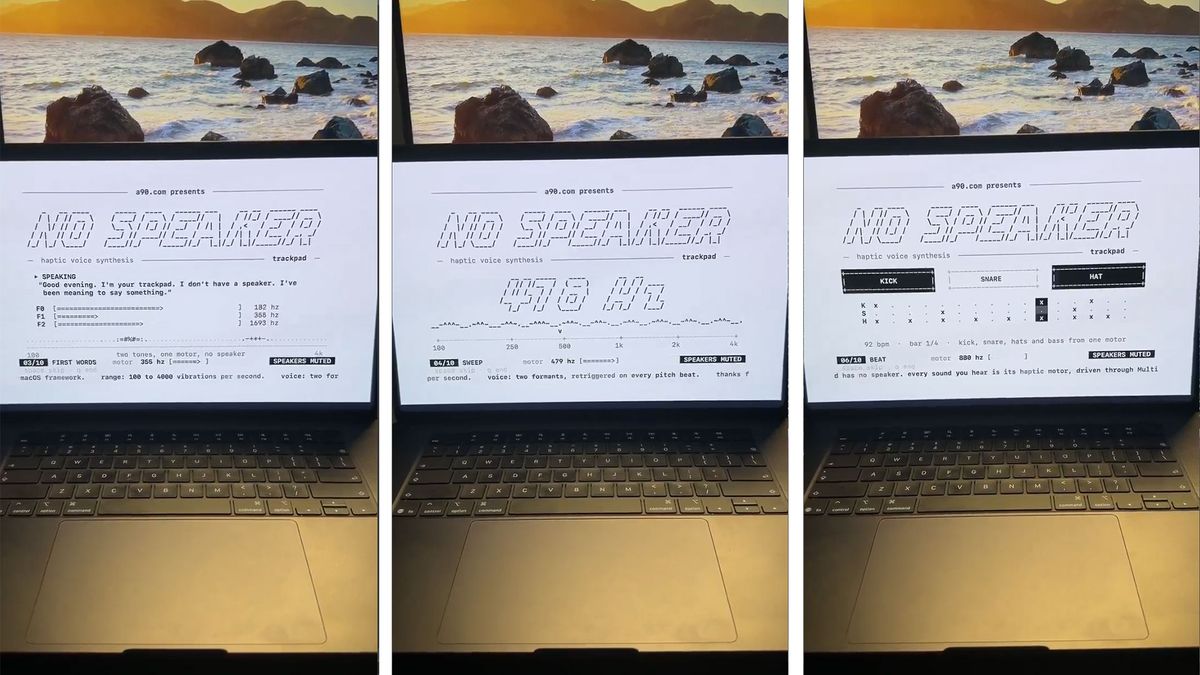
The MacBook's Force Touch trackpad is considered one of the crown jewels among Apple's laptop technologies. Now Cody Collier, AKA os6 on GitHub, has devised another way to make use of Apple's trackpad design, albeit an unusual and probably not very useful one. The trackpad's haptic engine can be used to make it work as a speaker using Collier's No Speaker software. Want to see and hear it for yourself before installing? There's a demo video below mixing speech, tones, and music playback through a MacBook trackpad.
i made my macbook trackpad talk using only the vibrations from its haptic motor my speakers are muted, every sound you hear is coming from the trackpad itself open source, try it here: https://t.co/MPEKltkFxO https://t.co/5rTtqdErDPNovember 22, 2026
As indicated in the intro, Apple's Force Touch trackpad has many fans, largely because of its smooth and solid glass surface with consistent and accurate tactile feedback driven by haptics, making it a step up from traditional clattering 'diving board' mechanical alternatives. The haptics that make it feel so responsive can also produce sounds, Collier found, after its haptic vibration frequencies were manipulated into the human hearing range.
"There's no speaker in a MacBook trackpad, just a small haptic motor that taps the glass so you feel a click," Collier explains on the GitHub project page. "No Speaker drives that motor up to 4,000 times a second, fast enough to make sound you can hear, and turns it into a voice. It talks, sings, raps, and becomes an instrument under your finger."
In the video, Collier shows the trackpad being used to play a melody, and as a simple drum machine with kick, snare, and high hats programmed on a 16-step grid. If for some reason you can't play the demo video for yourself, suffice to say No Speaker audio quality is pretty terrible. The nearest approximation to the trackpad's output quality might be the legendary but ancient Speak & Spell with a severely damaged speaker.
The GitHub page contains links to the Mac software and command-line examples to test on your trackpad. Passing parameters to the installed nospeaker command lets you send text strings for it to speak, adjust the No Speaker voice, play test tones, and switch between various UI modes.
To have some no speaker fun with this project, you can run it yourself and fiddle with the input parameters and settings. It has been tested on a MacBook Pro (Mac17,10) with M5 Max and macOS 27.2.1. The author notes the Force Touch trackpad first appeared in MacBooks starting in 2015, so it may work on anything from then onwards. macOS 12 or later on Apple Silicon, or macOS 13 or later on Intel, are also essentials. The app is smart enough to alert a user that there is no Force Touch trackpad present if they attempt to run it on such a machine.
The MacBook Force Touch trackpad isn't the first device or component that has been coaxed into audio playback duties contrary to its designed purpose. Tech tinkerers have previously played music on floppy drive motors and used hard drive actuators as speakers. Another example of out-of-scope hacking on a modern MacBook was the use of the hidden ‘LidAngleSensor’ API to make opening and closing the lid sound like a creaky door being adjusted.
Get Tom's Hardware's best news and in-depth reviews, straight to your inbox.
Download the Tom's Hardware app for up-to-the-minute updates on iOS and Android. Also follow Tom's Hardware on Google News, or add us as a preferred source, to get our latest news, analysis, & reviews in your feeds.