 Newshot
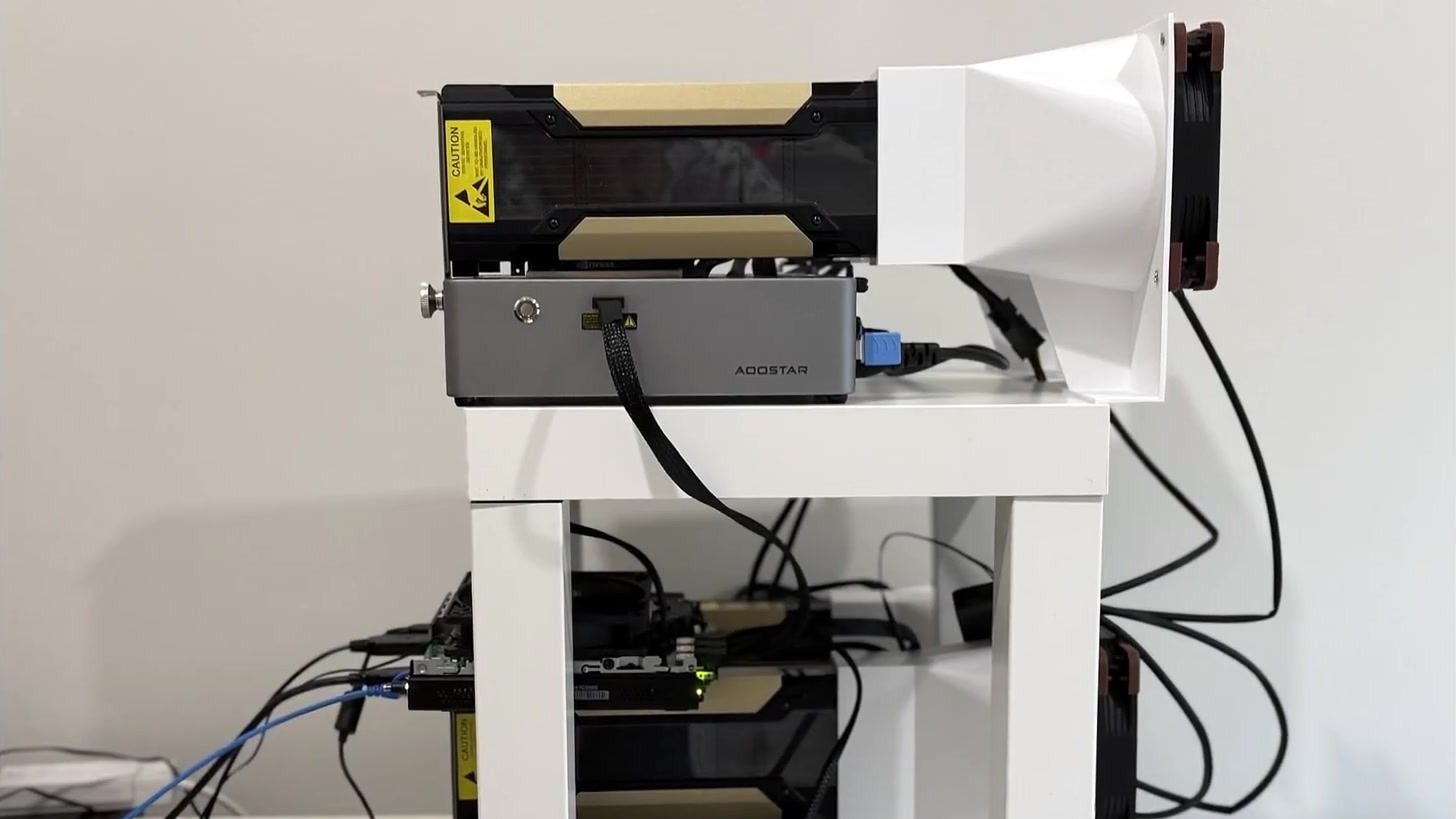
A homelabber has built a local AI system out of four used 32GB Nvidia V100s and a refurbished Lenovo M720q Tiny mini PC. Ok_Kaleidoscope9103’s construction, detailed on Reddit, relies on the GPUs going over four OCuLink cables from a PCIe switch card, with a solder bridge on the riser and coreboot getting past a BIOS that only booted two cards. The quiet-running build has the full 128GB of VRAM and can hit about 285 tokens per second in total running Qwen3.8-27B across its four cards.
图表:from r/homelab
4x Tesla V100 32 GB (128 GB VRAM) hanging off a Lenovo M720q Tiny over OCuLink - ~62 dB, ~A$6.5k all-in from r/homelab
The user, who gives his name as Michael, details his “home AI box” in a YouTube video billed as a “full build guide.” The Australian builder describes the setup as “four docks, four datacentre cards, one little PC” in a “noise optimised build.”
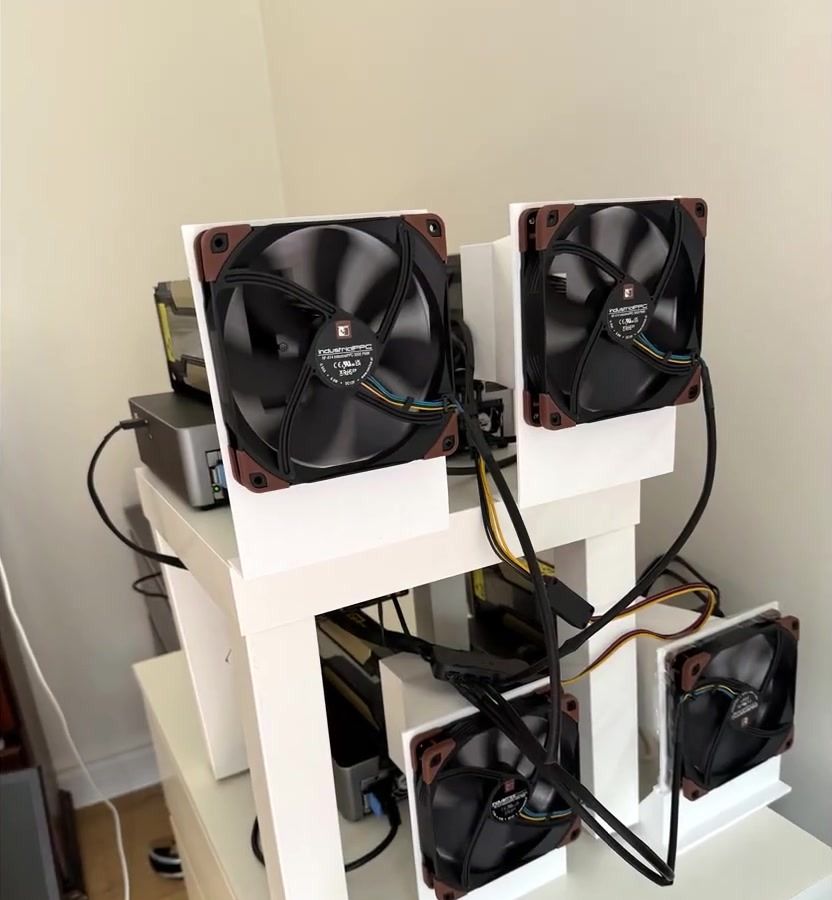
The hardware for this particular build is based on a Lenovo M720q Tiny desktop, which has an i5-9400T CPU with 64GB of DDR4. With a matching Lenovo 01AJ940 riser and a CEACENT CNOL4PE08 PCIe switch card — this has a 24-lane PEX8724 switch on board for an x8 link in and four x4 OCuLink ports out — each GPU card can run at PCIe Gen3 x4. OCuLink is an external PCIe cable connector often used with external GPUs (eGPU).
On the software and firmware end, the Tiny had some roadblocks that had to be overcome. It “only powers its riser slot when the card pulls the presence pin,” which the switch card doesn’t, so a solder bridge was needed on the back of the riser. Then, “Lenovo’s BIOS only leaves a 128 GB window for 64-bit devices,” and each 32GB V100 needs 64GB, which limits the stock firmware to just two cards; a third “hangs at POST.”
His workaround used coreboot 26.09 built for the board with an EDK2 payload and a config setting that allows above-4G allocation. This expands the window to about 486GB and, with three patches, more features were enabled: the riser slot is always on, there is a Wake-on-LAN override, and merged memory type range registers (MTRRs). Flashing it needed a CH341A programmer and SOIC8 clip for the BIOS chip.
He then added four AOOSTAR AG01 eGPU docks, each with a built-in 800 W PSU, and assigned one V100 to each dock. Each dock’s PSU feeds its V100 through a dual PCIe 8-pin to CPU/EPS 8-pin adapter, because the card takes a CPU 8-pin. The Tesla V100s are otherwise passively cooled and rely on chassis or other external airflow.
Then there’s the matter of cooling without ear-bleeding. The V100s each get a 3D-printed 140 mm funnel — designed with the help of AI — with a Noctua NF-A14 iPPC-3000 fan, with all four driven on an ARCTIC 10-port USB fan controller. A separate ARCTIC P12 Silent is mounted in a Dremel-drilled hole in the Tiny’s lid to cool the switch card, as that does run hot. He measured the end result at about 62 dB at a distance of one meter.
Get Tom's Hardware's best news and in-depth reviews, straight to your inbox.
A script tracks the hottest card, stopping work at 83°C and powering the system off at 87°C. To keep temperatures in check, each card is also power-capped to 200 W, or 800 W total. A recent, separate dual-GPU build we detailed needs dual 12W fans to keep the Optane and system memory cool.
With this 4-card setup, 44.7 TFLOPS is doable with FP32 with a 71°C peak; this compares to Nvidia’s rating of 14 TFLOPS for each 250 W card. A single RTX 5090 is rated at 104.8 TFLOPS at 575 W, nearly double the 56 TFLOPS of four V100s. Qwen3.8-27B Q6 can chat at about 40 tokens per second with one card and about 285 per second with all four, each card running its own copy and handling four requests at once. A larger model, Qwen3.8-Flash-Next-125B-A6B IQ4_XS, does about 43 tokens per second on chat over all four, or about 116 with eight requests.
The builder says that this cost him “~A$6.5k all-in,” a figure that includes local taxes; he puts it closer to $3,500 in U.S. dollars. Check the table for the cost breakdown. As noted in our coverage of other V100 builds, the cost of some of this hardware — SXM2 V100s, in particular — has climbed significantly this year; he says his PCIe cards “jumped in price” in recent months.
| Part | A$ | US$ |
|---|---|---|
| 4x V100 PCIe 32GB (used) | ~1,070 each | ~699 each |
| 4x AOOSTAR AG01 dock | ~180–240 each | ~120–155 each |
| 2x 32GB DDR4 SODIMM | ~275 each | ~180 each |
| Lenovo M720q Tiny (refurb) | ~259 | ~170 |
| CEACENT switch card | ~103 | ~67 |
| Lenovo riser | ~38 | ~25 |
| CH341A + clip | ~40 | ~26 |
| ARCTIC fan controller | ~29 | ~19 |
| Tapo smart plug | ~21 | ~14 |
4x V100 PCIe 32GB (used)
4x AOOSTAR AG01 dock
~180–240 each
~120–155 each
2x 32GB DDR4 SODIMM
Lenovo M720q Tiny (refurb)
CEACENT switch card
Lenovo riser
CH341A + clip
ARCTIC fan controller
Tapo smart plug
Although he calls using the full 128GB a “party trick,” he actually does use the build with Qwen3.8-27B, running separately on each card, to mine stock-announcement data dating back to the early 1990s for his business, which needs to read “millions of documents.” The build has been stable, running “pretty much 24/7 for a few weeks,” and with this setup he expects the system to pay itself back in about three months.
Some commenters wonder why he didn’t take the route of a fellow Redditor, a lawyer, who experimented with 32GB V100s as SXM2 modules on NVLink boards. His answer: noise, and that “the PCIe cards at the time were cheaper.” He also compares his four V100s to an RTX 5090, and says they have 4x the VRAM and about 2x the total memory bandwidth at “about half the price” of a 5090 in Australia. Next up is benchmarking SFNX and Infer-V100 to see how it compares to his llama.cpp setup.cpp setup, and possibly adding a second set of four V100s.

Follow Tom’s Hardware on Google News, or add us as a preferred source, to get our latest news, analysis, & reviews in your feeds.

Shane Downing is a Contributing Writer for Tom’s Hardware, covering consumer storage, PC hardware, and AI.