 Newshot
用 AWS Emulator 测试 Terraform
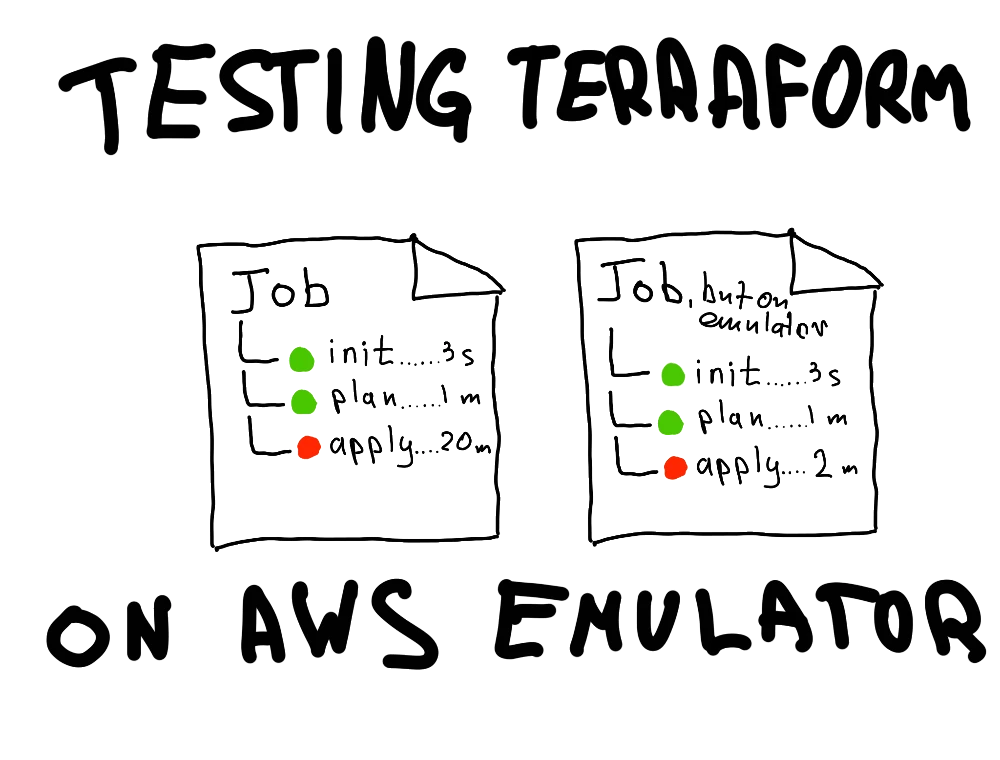
Terraform plan 通过了,显示一切正常,所有必要的资源变更也都列了出来。你触发 apply,然后……任务失败了,报了一个晦涩的错误,说某个资源无法更改。你另开一个 pull request 再试一次。也许你又遇到了错误。听起来很熟悉吧?我敢打赌确实如此。这类问题我遇到过太多次,多到都不敢数了。但最近 AWS 发布了一个新工具叫 Emulator,它可以模拟真实的 AWS API 端点,应该非常适合这类任务!
定义问题
plan 与 apply 任务之间的差异问题在于,plan 无法针对真实基础设施模拟每一次实际的 API 调用。它基于我们写入的静态声明做出安全假设——应用顺序、必要参数、正确的配置值。这些模拟调用无法确知你在 AWS 中已经有一个名为 "my-bucket-asdasdasd" 的资源,或者你正试图将 PostgreSQL RDS 实例从版本 14 升级到版本 18 却没有显式加上 "apply immediately" 标志。有人可能会说,那就在本地尝试 apply 呗,但这多少会破坏整个自动化工作流。那么答案是什么?
有多个工具可以部分或完整地模拟 AWS 服务,但它们缺少的是对服务架构的真实认知。它们可能相似,但不会完全一致,有时这微小的差异会引发大量问题。毕竟,什么能最接近 AWS API,如果不是同一个 AWS API,但是临时的呢?
AWS Emulator
AWS Emulator 的好处在于它是一个自包含的二进制文件(或 Docker 容器),可以在本地或 CI 工作流中使用。这意味着通常的 "Plan > Apply" terraform 工作流变成了 "Plan > 针对模拟 AWS 基础设施执行 Apply 以测试 plan > 在真实 AWS 基础设施上执行 Apply"。这意味着任务会稍微长一点,但如果你像我一样,apply 任务是在 PR 之后、提交到主分支时运行的,这就省去了为了修复问题而另开一个分支的麻烦。
针对本地 AWS Emulator 运行 Terraform
让我们从本地环境开始,看看如何将 AWS Emulator 与实际 Terraform 代码结合使用。所有代码都可以在我的示例 GitHub 仓库中找到。
首先是安装。你可以通过包管理器安装 aws-emulator,或者用 Docker 构建它。我会使用 Docker,以保持系统干净,不再多装一个包:
文章标题:用 AWS Emulator 测试 Terraform
正文:
        bash$ docker build -t aws-emulator .
$ docker images
IMAGE                 ID             DISK USAGE   CONTENT SIZE   EXTRA
aws-emulator:latest   3c8fdb957b45       1.24GB             0B          # wow it's chonky
$ docker run --rm -d -p 9297:9297 aws-emulator -a off
dcc416f234aaa3ec2966c9e8dcde7870f8d03057ec8a465cb8960617af82e501
$ docker logs dcc416f234aaa3ec2966c9e8dcde7870f8d03057ec8a465cb8960617af82e501
{"timestamp":"2026-11-12T14:51:16.261883Z","level":"INFO","fields":{"message":"aws-emulator emulator starting"},"target":"aws_emulator"}
This emulator collects usage and error telemetry: enabled (on by default; opt out any time); disable with EMULATOR_TELEMETRY=off or [telemetry] enabled = false in /home/emulator/.aws/emulator/config.toml
{"timestamp":"2026-11-12T14:51:16.270635Z","level":"INFO","fields":{"message":"emulator server information","endpoint_url":"https://127.0.0.1:9297","health_check_url":"https://127.0.0.1:9297/__admin/health","config_file":"/home/emulator/.aws/emulator/9297/config","ca_file":"/home/emulator/.aws/emulator/9297/ca.pem","java_truststore_file":"/home/emulator/.aws/emulator/9297/truststore.p12"},"target":"aws_emulator_server"}
{"timestamp":"2026-11-12T14:51:16.270655Z","level":"WARN","fields":{"message":"the emulator listens on 0.0.0.0, not loopback: other machines that can reach port 9297 can call it; bind 127.0.0.1 (-b 127.0.0.1) unless that is intended","bind_address":"0.0.0.0"},"target":"aws_emulator_server"}
{"timestamp":"2026-11-12T14:51:16.270659Z","level":"WARN","fields":{"message":"request authentication is off: the emulator accepts any request, signed or not; start it with -a on to require signatures","bind_address":"0.0.0.0"},"target":"aws_emulator_server"}
它已经启动并运行了!在上面的示例中,我让容器不受限制地运行(官方 AWS 文档建议设置内存和交换空间限制:--memory=2g --memory-swap=2g,但在本地这样没问题)。我还禁用了授权(标志 -a off),以稍微简化一下。
为了确认 aws-emulator 已启动并运行,让我们查询管理端点:
        bash$ curl -sk https://127.0.0.1:9297/__admin/health
ok
好,假的 AWS 已经上线了,让我们部署一些基础设施吧!
我创建了一个用于 Terraform 的示例 AWS 栈,并将在本文中使用它。首先,让我们配置 Terraform 针对 aws-emulator 而不是真实的 AWS API 进行操作。providers.tf 将如下所示:
        hclprovider "aws" {
  access_key = var.access_key
  secret_key = var.secret_key
  region     = var.region

insecure = true # The emulator serves HTTPS with a self-signed certificate. Skip verification.

s3_use_path_style = true   # The emulator uses one IP endpoint. Put the bucket name in the path.

# Do not call the real AWS or the instance metadata service.
  skip_credentials_validation = true
  skip_metadata_api_check     = true
  skip_requesting_account_id  = true
  skip_region_validation      = true

# Send every service to the emulator instead of AWS.
  endpoints {
    ec2        = var.emulator_endpoint
    lambda     = var.emulator_endpoint
    iam        = var.emulator_endpoint
    sts        = var.emulator_endpoint
    cloudwatch = var.emulator_endpoint
    logs       = var.emulator_endpoint
    events     = var.emulator_endpoint
    sns        = var.emulator_endpoint
  }

default_tags {
    tags = var.tags
  }
}
真实在线基础设施与假基础设施之间的区别在于,我们设置了一堆标志来允许不安全的连接(也许关掉身份验证实际上并没有更简单?),并且我们把设置中使用的每个服务的端点都指向了模拟器端点,它运行在本地 Docker 容器中:
        hcl# variables.tf
variable "emulator_endpoint" {
  description = "Base URL of the AWS Emulator"
  type        = string
  default     = "https://127.0.0.1:9297"
}
...
其余配置照常:资源、变量、模块(如果有的话)。就是你项目里有的那些。
我们继续测试我们的配置。(我会省略完整的 terraform 输出,否则这篇文章会长达 3 公里)
        bash$ cd terraform/
$ terraform init
Initializing the backend...
...
Terraform has been successfully initialized!
...
$ terraform plan
...
Plan: 15 to add, 0 to change, 0 to destroy.

Changes to Outputs:
  + alarm_name          = "ttwae-lambda-errors"
  + event_rule_arn      = (known after apply)
  + lambda_function_arn = (known after apply)
  + security_group_id   = (known after apply)
  + sns_topic_arn       = (known after apply)
  + subnet_id           = (known after apply)
  + vpc_id              = (known after apply)
Plan 能跑通!这看起来不错,不过并不是我们此行的目的。尽管如此,这也是个好兆头。现在进行真正的测试。
        bash$ terraform apply --auto-approve
...
Apply complete! Resources: 15 added, 0 changed, 0 destroyed.

Outputs:

alarm_name = "ttwae-lambda-errors"
event_rule_arn = "arn:aws:events:us-east-1:000000000000:rule/ttwae-schedule"
lambda_function_arn = "arn:aws:lambda:us-east-1:000000000000:function:ttwae-worker"
security_group_id = "sg-00000000000000085"
sns_topic_arn = "arn:aws:sns:us-east-1:000000000000:ttwae-alarms"
subnet_id = "subnet-00000000000000089"
vpc_id = "vpc-00000000000000080"
apply 也能跑通!太棒了!
遗憾的是,运行中的 aws-emulator 容器并不会在日志中显示它收到了哪些 API 请求、以及底层发生了什么,不过我猜这个工具目前这样已经足够好了。
完成后,停止容器:
bash$ docker stop dcc416f234aaa3ec2966c9e8dcde7870f8d03057ec8a465cb8960617af82e501
用 --rm 启动的容器在停止后会自动移除,因此不需要额外的清理。至于这个模拟器 —— 它把状态存储在内存中,所以每次容器重启都会丢弃之前所有操作的记录以及任何过时的状态。
在 CI 流水线中针对 AWS Emulator 运行 Terraform
现在进行真正的测试:我们能否把所需的逻辑封装进 CI 流水线?我们来想想。
为了在流水线中成功调用,我们几乎需要一切都保持不变,但我们会受到时间(越快越好,并且整体超时要合理)和资源的限制。
下图展示了针对 aws-emulator 执行 terraform apply 的工作流。为此我决定尝试用包管理器安装(毕竟构建器是临时的)以及正确的身份验证。包含实际成功运行的完整工作流可以在示例 GitHub 仓库中找到。
        yaml---
name: terraform-against-emulator
on:
  push:
    branches: [main]
permissions:
  contents: read
jobs:
  terraform:
    runs-on: ubuntu-latest
    env:
      EMULATOR_PORT: "9297"
      # Empty keys make the provider fall back to the shared credentials
      # file that the emulator writes. insecure=false verifies the
      # emulator cert through AWS_CA_BUNDLE
      TF_VAR_access_key: ""
      TF_VAR_secret_key: ""
      TF_VAR_insecure: "false"

文章标题:使用 AWS Emulator 测试 Terraform

正文:
steps:
      - uses: actions/checkout@3d3c42e5aac5ba805825da76410c181273ba90b1 # v7.0.1
      - name: Install the AWS Emulator
        run: |
          curl -fsSLo aws-emulator.deb \
            https://downloads.aws.com/aws-emulator/packages/aws-emulator/LTS/latest/aws-emulator_amd64.deb
          sudo apt-get install -y ./aws-emulator.deb
          aws-emulator -v
      - name: Start the emulator with signature checks on
        run: |
          nohup aws-emulator > /tmp/aws-emulator.log 2>&1 &
          echo "Waiting for the emulator to answer..."
          CA="$HOME/.aws/emulator/${EMULATOR_PORT}/ca.pem"
          for i in $(seq 30); do
            if [ -f "$CA" ] && curl -sf --cacert "$CA" \
                "https://127.0.0.1:${EMULATOR_PORT}/__admin/health" >/dev/null; then
              echo "Emulator is ready."
              exit 0
            fi
            sleep 1
          done
          echo "Emulator did not become ready." >&2
          cat /tmp/aws-emulator.log >&2
          exit 1
      - name: Point Terraform at the emulator credentials and certificate
        run: |
          DIR="$HOME/.aws/emulator/${EMULATOR_PORT}"
          {
            echo "AWS_SHARED_CREDENTIALS_FILE=$DIR/emulator_credentials"
            echo "AWS_CONFIG_FILE=$DIR/config"
            echo "AWS_CA_BUNDLE=$DIR/ca.pem"
            echo "AWS_REGION=us-east-1"
            echo "AWS_DEFAULT_REGION=us-east-1"
            echo "AWS_EC2_METADATA_DISABLED=true"
            echo "AWS_DISABLE_HOST_PREFIX_INJECTION=true"
          } >> "$GITHUB_ENV"
      - uses: hashicorp/setup-terraform@dfe3c3f87815947d99a8997f908cb6525fc44e9e # v4.0.1
        with:
          terraform_wrapper: false
      - run: terraform -chdir=terraform init -input=false
      - run: terraform -chdir=terraform validate
      - run: terraform -chdir=terraform plan -input=false
      - run: terraform -chdir=terraform apply -auto-approve -input=false
这只是实际那份精彩 workflow 文件的一个粗糙摘录,它勾勒出了最重要的几个步骤:安装 emulator、配置 terraform、plan 和 apply。在示例 terraform 架构上,整条流水线耗时 1m25s,在我看来还可以,但仍有改进空间:在上面加点缓存、把校验留在本地钩子里、格式检查,等等。
运行一个故意失败的 apply 作业
别人在网上写的代码,你复制粘贴到自己机器上就能直接跑起来,感觉总是很好。所以我总会在发布文章之前亲自把描述的流程跑一遍——构建、测试、修复、重试。但只展示顺利的场景,会让人对该工具产生一种虚假的信任感。
让我们故意弄坏点东西。
在示例代码库里,我加了一个变量,启用后会让这个 stack 尝试部署一个声明有误的资源。它能通过 plan 作业,但会在 apply 时失败。
        hclvariable "enable_failure_demo" {
  description = "Create a DynamoDB table with an invalid name."
  type        = bool
  default     = false
}
在运行时把这个变量设为 true 就会弄坏我们的 stack。来看看:
        bash$ cd terraform/
$ terraform init
Initializing the backend...
...
$ terraform plan -var 'enable_failure_demo=true'
...
Plan: 16 to add, 0 to change, 0 to destroy.

Changes to Outputs:
...
  + failure_demo_table_arn = (known after apply)
...
$ terraform apply -auto-approve -var 'enable_failure_demo=true'
...
╷
│ Error: creating AWS DynamoDB Table (ab): operation error DynamoDB: CreateTable, https response error StatusCode: 400, RequestID: 4TLD3XUB94783KNA4C76L8BEZ26UU8LS4IBN2IEKZJLAK4NMVTQ4, api error ValidationException: 1 validation error detected: Value 'ab' at 'tableName' failed to satisfy constraint: Member must have length greater than or equal to 3
│
│   with aws_dynamodb_table.bad_name[0],
│   on dynamodb.tf line 10, in resource "aws_dynamodb_table" "bad_name":
│   10: resource "aws_dynamodb_table" "bad_name" {
│
文章标题:用 AWS Emulator 测试 Terraform
正文: 就是这样。这个问题只有在实际调用 API 时才会出现,在 plan 任务中不会出现。
对于这类场景,这个模拟器是无价的。
局限性与注意事项
AWS Emulator 太棒了。我最近很少对新工具这么兴奋(主要是因为几乎所有这些工具都接近或关于 AI),但这个工具实在太好了,正好挠到了我长久以来的那块痒处。
不过,它还远非完美。
首先,它无法有效模拟 IAM 策略和权限检查。这很遗憾,因为权限验证是面向生产的安全的关键一步。希望这个工具能进一步演进,并在未来的更新中加入这一功能。
其次,作为一个仍在开发中的工具[1],它的能力相当有限。甚至在我写这篇文章的过程中,就遇到了好几处 501 NotImplemented。如果你的基础设施规模庞大,有很多怪癖和奇怪配置以及超级新的服务,这会稍微让事情复杂一些。不过,AWS 发布新版本的频率相当高,而且他们对 Emulator 的局限性相当坦率,这很好。
最后但同样重要的是遥测。AWS 明确说明了它会收集遥测数据以及这些遥测数据包含什么内容。这是诚实的行为,我喜欢这种做法。他们甚至允许你禁用遥测,这进一步增加了我对这个工具的信任。我理解这一功能背后的理由(工具正在积极开发中,他们需要数据来了解使用模式和哪里出了问题),但在大科技公司无孔不入的持续监控时代,这仍然引起了一丝担忧。不过话又说回来,对于极度偏执的人来说,代码是开源的,可以重新构建并剔除遥测。
回复这篇文章 ✉️
- 截至撰写本文时,AWS Emulator 已上线 1 天。 ↩︎