 Newshot
Tom's Hardware Verdict
The Gigabyte MO27Q2A is a superlative value among 27-inch QHD OLEDs with high performance, accurate color and premium build quality. It matches or exceeds many more expensive monitors.
Reasons to buy
- +Bright, sharp, and colorful picture
- +Pro-level accuracy out of the box
- +Useful Adobe RGB and sRGB color modes
- +Premium game performance
- +USB ports with KVM
- +Tactical Switch for quick resolution changes
- +Excellent build quality with mostly metal construction
- +Terrific value
Reasons to avoid
- -No LED lighting
Why you can trust Tom's Hardware Our expert reviewers spend hours testing and comparing products and services so you can choose the best for you. Find out more about how we test.
Features and Specifications
- Page 1: Features and Specifications
- Page 2: Response, Input Lag, Viewing Angles and Uniformity
- Page 3: Brightness and Contrast
- Page 4: Grayscale, Gamma and Color
- Page 5: HDR Performance
- Page 6: Conclusion
I have long said that choices are important, and nowhere is that better illustrated than in the best OLED gaming monitor category. Once an exotic and expensive technology, it is now much more affordable, thanks to a plethora of new models coming to market.
Gigabyte is certainly a leader in the price war with new models that deliver tremendous performance, image quality, and value. Its latest effort is a 27-inch QHD OLED model that refreshes at 280 Hz. It’s the MO27Q2A, and it leaves nothing out in its quest to be fast, beautiful, and packed with features. You get Adaptive-Sync with G-Sync and FreeSync certification, wide gamut color courtesy of Quantum Dot tech, HDR10, VESA DisplayHDR 400 True Black, USB ports with KVM, internal speakers and a better-than-average stand. Let’s take a look.
Gigabyte MO27Q2A Specs
| Panel Type / Backlight | Quantum Dot Organic Light Emitting Diode (QD-OLED) |
|---|---|
| Screen Size / Aspect Ratio | 27 inches / 16:9 |
| Max Resolution and Refresh Rate | 2560x1440 @ 280 Hz |
| Row 3 - Cell 0 | FreeSync and G-Sync Compatible |
| Native Color Depth and Gamut | 10-bit / DCI-P3+ |
| Row 5 - Cell 0 | VESA DisplayHDR 400 True Black, HDR10 |
| Response Time (GTG) | 0.03ms |
| Brightness (mfr) | 250 nits full field |
| Row 8 - Cell 0 | 1,000 nits 3% window |
| Contrast | Unmeasurable |
| Speakers | 2x 5w |
| Video Inputs | 1x DisplayPort 1.4 |
| Row 12 - Cell 0 | 2x HDMI 2.1, 1x USB-C (18w) |
| Audio | 3.5mm headphone output |
| USB 3.2 | 1x up, 2x down |
| Power Consumption | 29.1w, brightness @ 200 nits |
| Panel Dimensions WxHxD w/base | 24 x 14.6-19.8 x 7.5 inches (610 x 371-503 x 190mm) |
| Panel Thickness | 2.56 inches (65mm) |
| Bezel Width | Top: 0.35 inch (9mm) |
| Row 19 - Cell 0 | Sides: 0.43 inch (11mm) |
| Row 20 - Cell 0 | Bottom: 0.67 inch (17mm) |
| Weight | 13.42 pounds (6.1kg) |
| Warranty | 3 years |
Panel Type / Backlight
Quantum Dot Organic Light Emitting Diode (QD-OLED)
Screen Size / Aspect Ratio
27 inches / 16:9
Max Resolution and Refresh Rate
2560x1440 @ 280 Hz
FreeSync and G-Sync Compatible
Native Color Depth and Gamut
10-bit / DCI-P3+
VESA DisplayHDR 400 True Black, HDR10
Response Time (GTG)
Brightness (mfr)
250 nits full field
1,000 nits 3% window
Unmeasurable
Video Inputs
1x DisplayPort 1.4
2x HDMI 2.1, 1x USB-C (18w)
3.5mm headphone output
1x up, 2x down
Power Consumption
29.1w, brightness @ 200 nits
Panel Dimensions
WxHxD w/base
24 x 14.6-19.8 x 7.5 inches
(610 x 371-503 x 190mm)
Panel Thickness
2.56 inches (65mm)
Top: 0.35 inch (9mm)
Sides: 0.43 inch (11mm)
Bottom: 0.67 inch (17mm)
13.42 pounds (6.1kg)
If there’s one thing that the MO27Q2A leaves out, it's LED lighting. There’s no colorful show to dazzle your opponents with. But nothing else has been sacrificed. There are HDMI 2.1 ports, DisplayPort 1.4 with DSC (Display Stream Compression), USB-C that supports video and 18 watts of power, plus USB Type-A and Type-B ports with KVM control. A pair of five-watt internal speakers delivers good audio, or you can use the 3.5mm headphone jack.
The screen is super colorful with over 108% coverage of DCI-P3 thanks to a Quantum Dot layer. Color is very accurate, so much so that I found calibration completely unnecessary. You get sRGB and Adobe RGB options as well. Brightness is solid at 250 nits for a full field and over 1,000 nits for a 3% window pattern. You can use variable brightness for SDR and HDR content to pump up small highlights for even more dynamic range.
High-performance gaming is the primary goal here, and for that, the MO27Q2A comes with a reliable 280 Hz refresh rate, Adaptive-Sync with certifications from Nvidia and AMD, and a host of Game Assist features like aiming points, sniper modes, flash suppression, timers, and a frame counter. Like all OLEDs, it has lightning-fast reflexes with super smooth motion rendering.
Gigabyte pays plenty of attention to panel care with a host of options like pixel refresh and logo detection. There’s extensive passive cooling (no fans) and AI control that tracks usage at the pixel level to keep everything in balance. The end result is longevity and reliability, which is backed by a three-year factory warranty that includes burn-in.
The MO27Q2A’s value is the most impressive part. At this writing, it sells for $399 online. It wasn’t long ago that you’d pay that for a 240 Hz QHD LCD. That category has dropped in cost as well, with some screens coming in around $200. But spending an extra $200 for an OLED seems like a no-brainer to me. Let’s see how the MO27Q2A fares in my tests.
Get Tom's Hardware's best news and in-depth reviews, straight to your inbox.
Assembly and Accessories
Gigabyte offers a bit of fanfare on the MO27Q2A’s carton with colored graphics that set it apart from the plain brown wrappers more commonly seen at the big box store. A clamshell lid opens to reveal blocks of crumbly foam containing the panel, upright, and base, which assemble without tools. The power supply is internal, so you get a selection of IEC cords plus cables for HDMI, DisplayPort, and USB. A little clip goes on the stand to tidy up the wiring.
Product 360
View Original
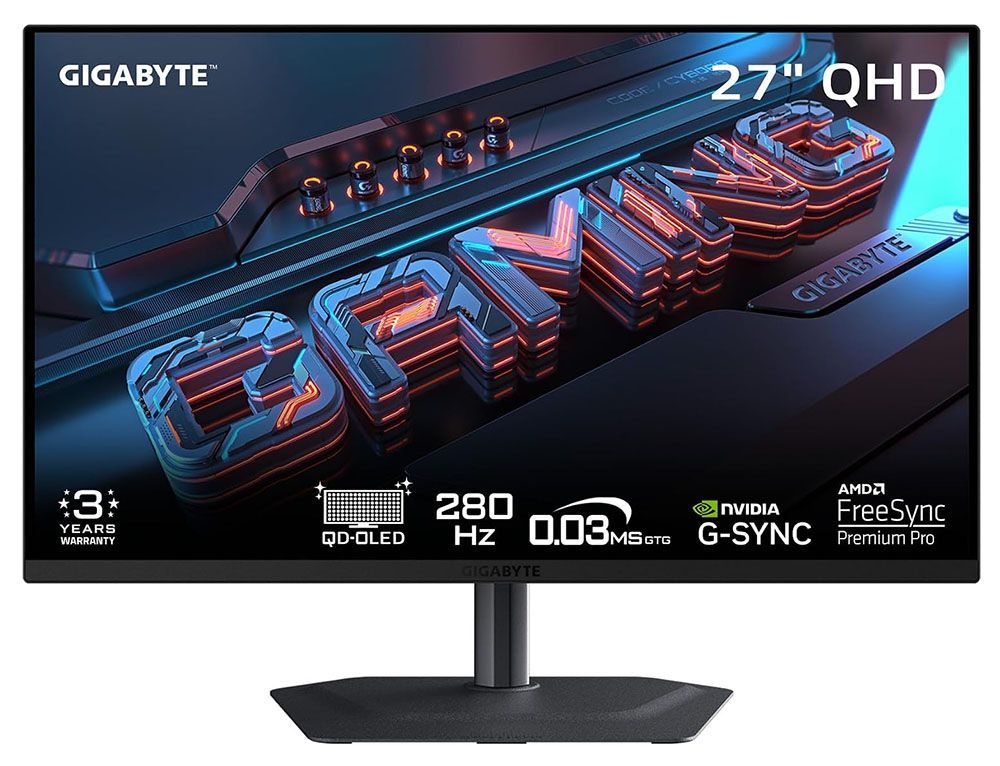
The panel is minimalist from the front with a thin flush bezel and a metal backing that wraps around the edges. A narrow trim strip crosses the bottom with a tiny Gigabyte logo in its center. The controls are under the center point and consist of a backlit joystick and two keys. One is the Tactical Switch, and it changes resolutions on the fly. More about that below.
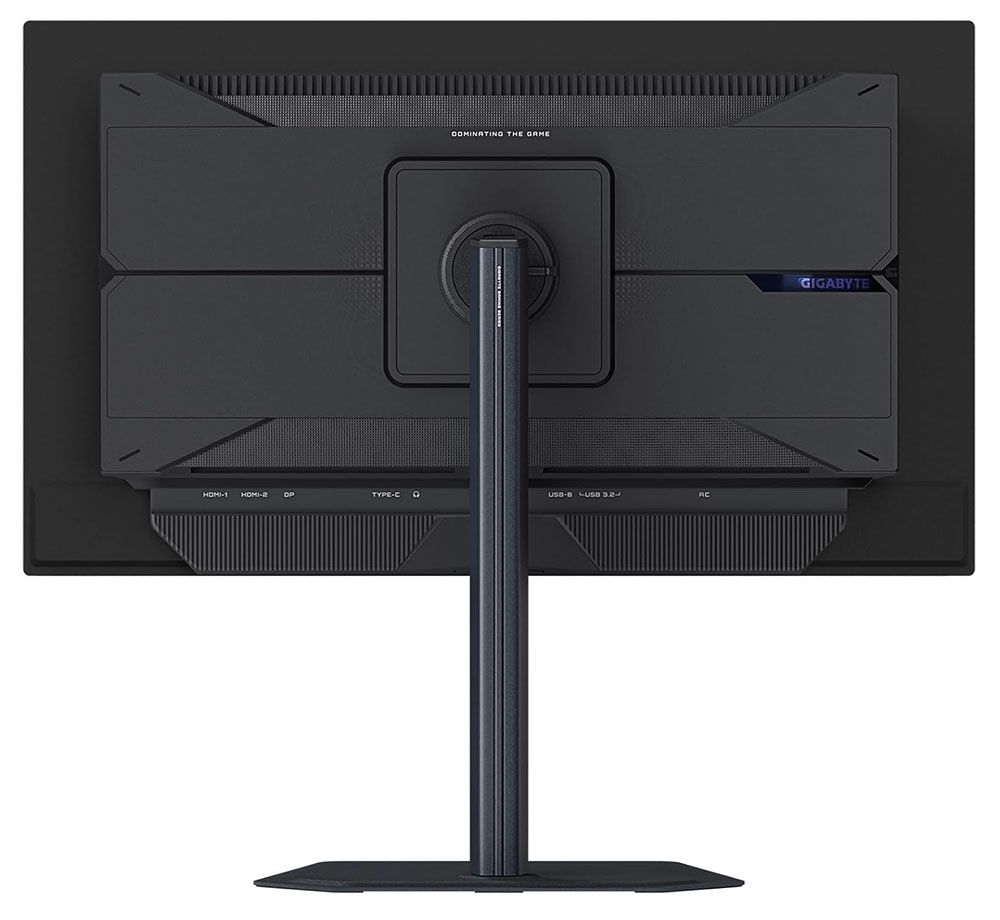
The stand is above average in quality with all-metal construction and smooth ergonomics. It includes 5.2 inches of height range plus 5/21 degrees tilt, 15 degrees swivel, and a 90-degree portrait mode. There is no hint of wobble or play. It is one of the better stands I’ve encountered, and I’ve encountered many.
From the side, you can see the panel-on-bulge design that is shared by many OLEDs. Not only does this look cool, but it actually is cool. The MO27Q2A’s panel is backed by metal, which acts as a heat sink. The bulge is also well ventilated, enough so that no fans are needed. A graphene layer behind the OLED contributes to cooling and hence, longevity.
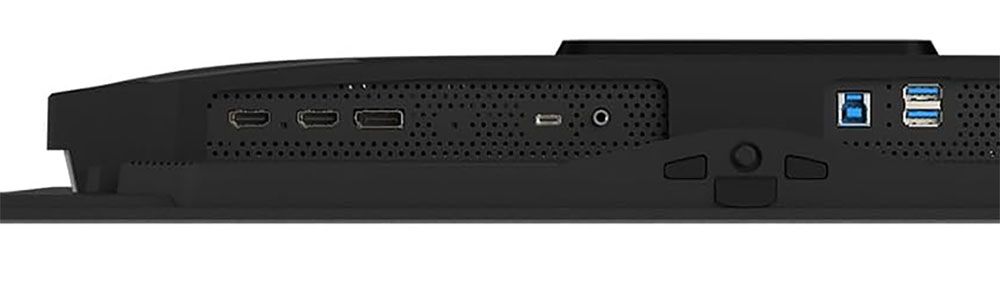
Underneath is a well-appointed I/O panel with two HDMI 2.1s, a DisplayPort 1.4 with DSC, a USB-C that supports video and 18 watts of power, and USB 3.2, one upstream and two down. They can be bound to different video inputs using the KVM feature in the OSD. You also get a 3.5mm headphone jack and a pair of internal speakers with five watts of amplification.
OSD Features
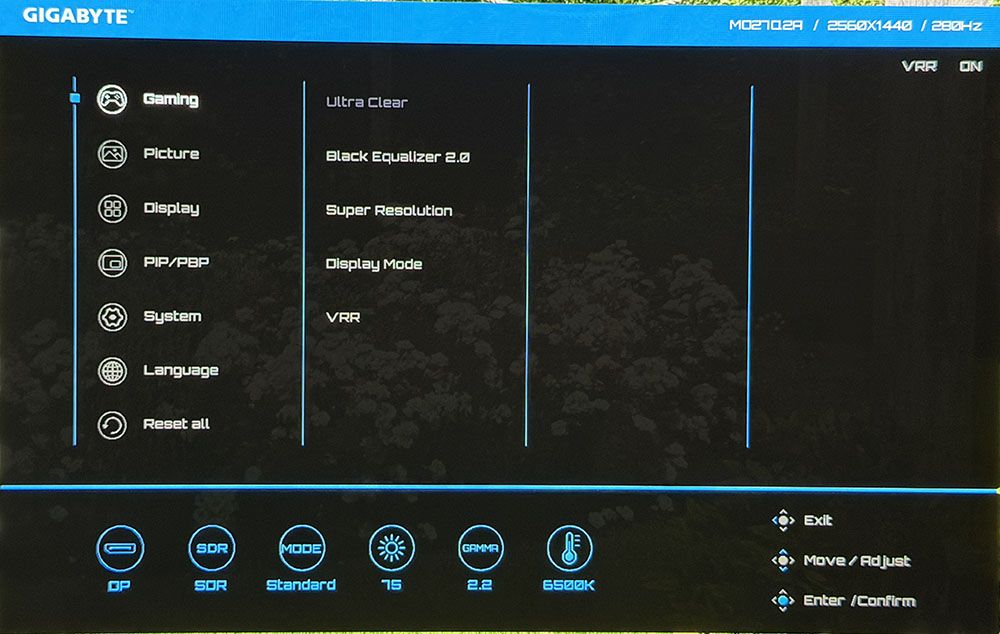
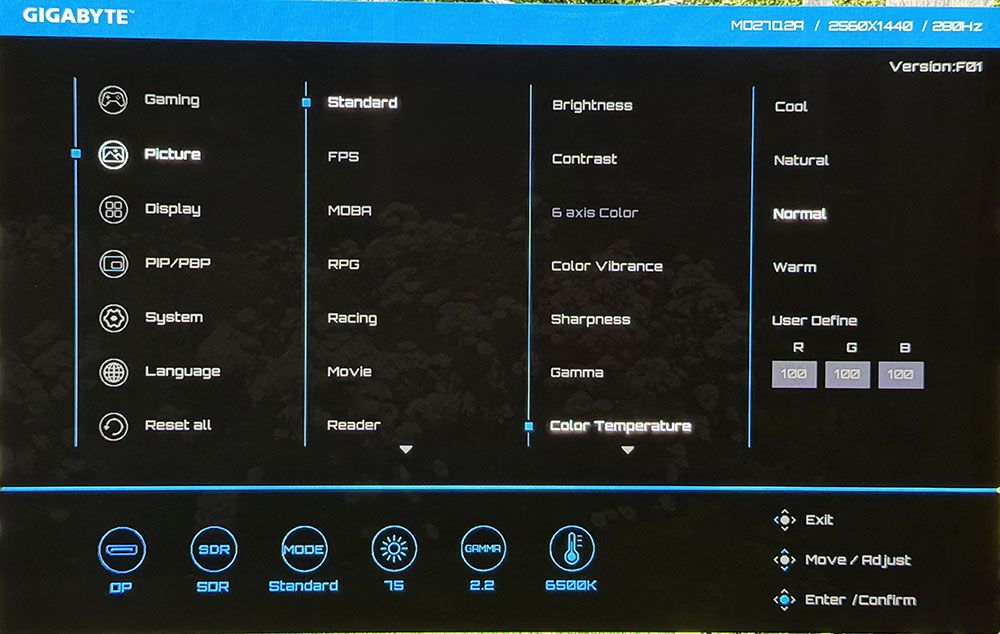
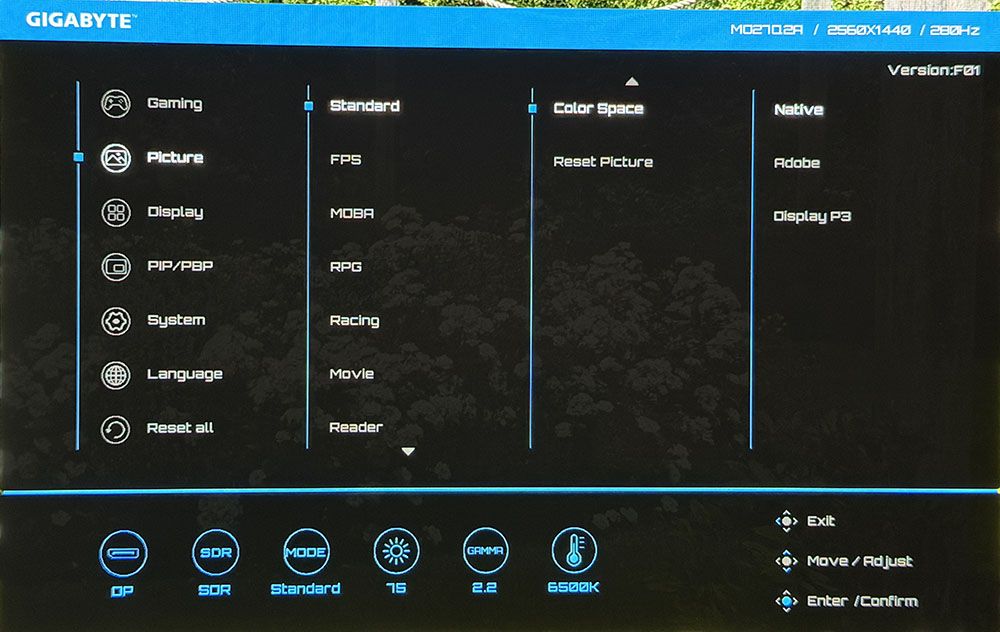
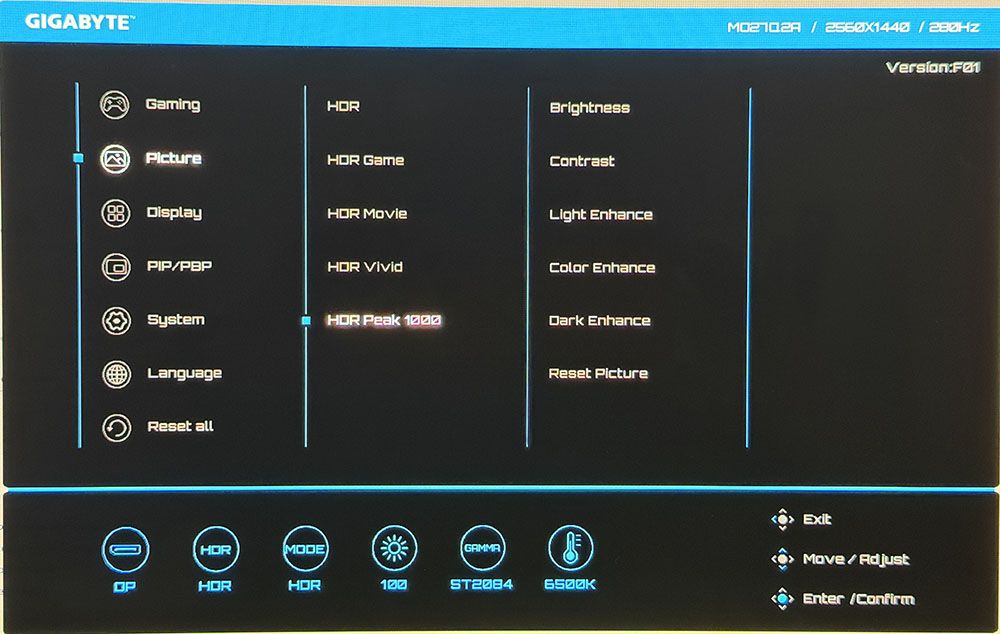
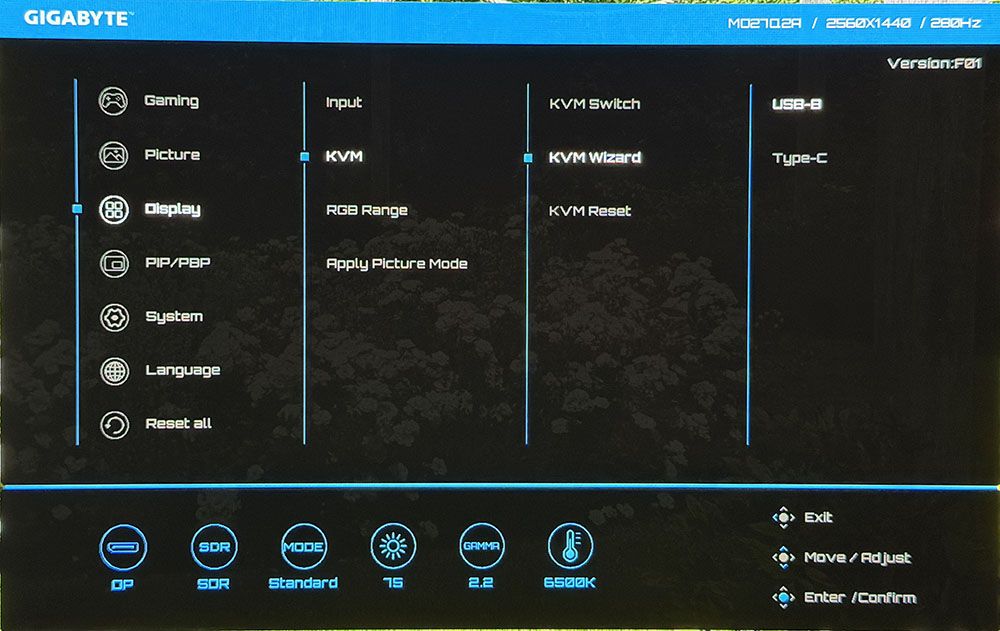
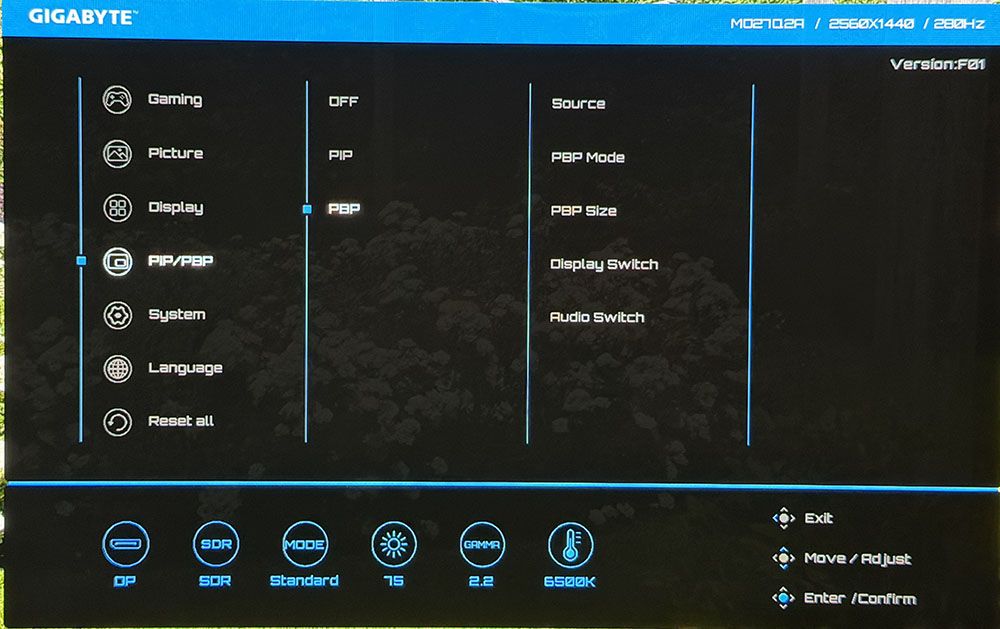
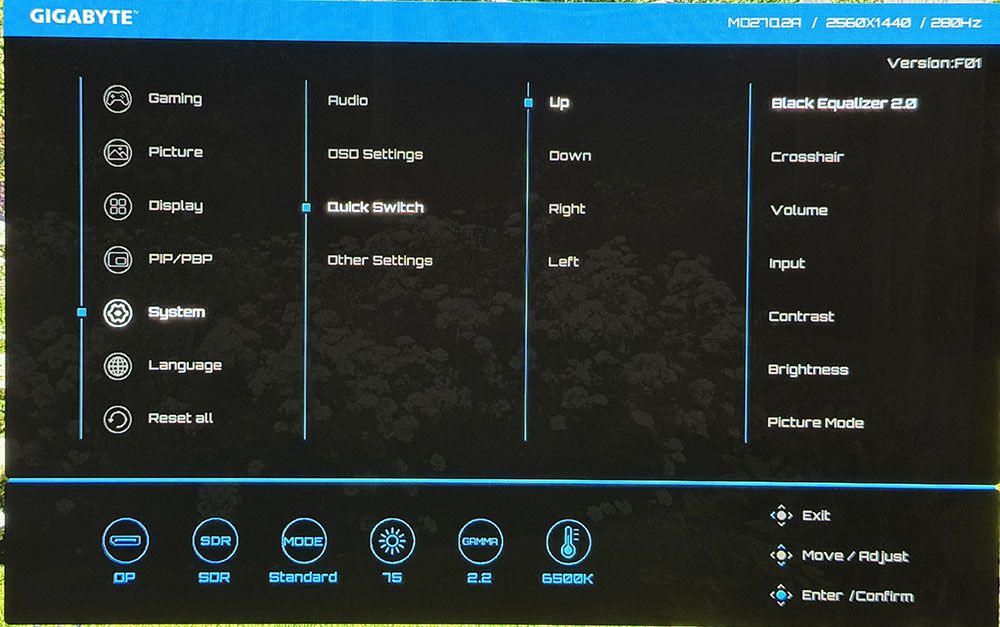
The MO27Q2A’s OSD presents complete information with signal status at the top and current settings shown at the bottom.
View Original
The Gaming menu includes a black frame insertion feature called Ultra Clear. It works at 280 or 120 Hz and is effective at removing motion blur. If you can run at 180fps or higher, you won’t need it. Other options include Black Equalizer, which increases shadow visibility, super resolution (edge enhancement, do not use), display mode for aspect ratio control, and a VRR toggle.
The MO27Q2A includes 10 picture modes mainly aimed at different game types. It comes out of the box in Eco, which limits brightness. Choose Standard to unlock the maximum light output. Within this mode, you can adjust color temp and gamma and choose a color space. My sample was nearly perfect out of the box, so good, in fact, that I could not improve it with calibration. If you want sRGB or Adobe RGB color, those choices are in the Color Space submenu. For sRGB, there’s an sRGB picture mode. HDR signals get their own five modes. Peak 1000 is the brightest and best choice there.
You can use the KVM Wizard to bind USB ports and video inputs. That way, one keyboard, mouse, and monitor can service multiple sources like a PC and a gaming console, for instance. You can also view two sources at once using the PIP/PBP options.
Quick Switch lets the user program the functions of the joystick directionals. It provides quick access to commonly used functions like brightness or crosshairs.
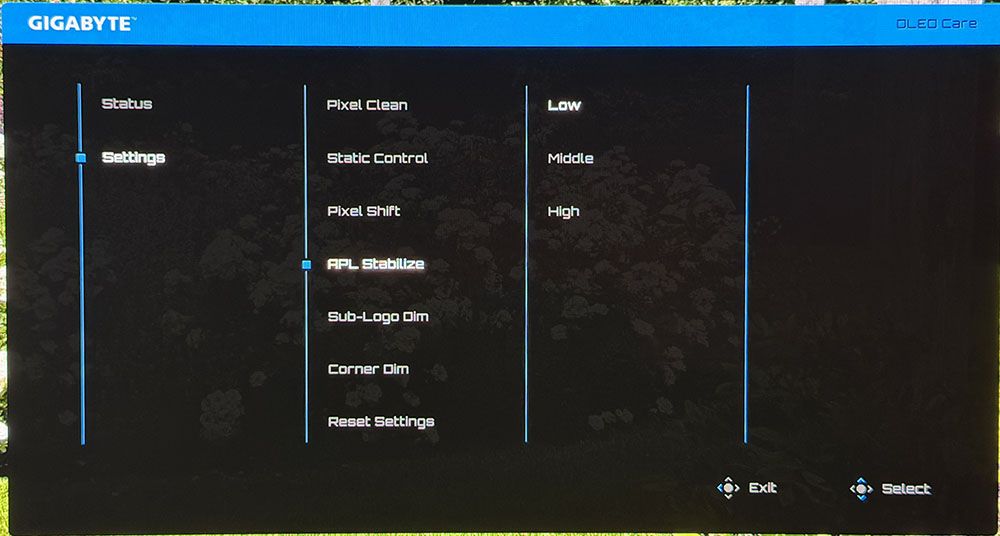
A separate screen comes up for the MO27Q2A’s OLED care options. This is where you’ll find APL Stabilize, which has two levels of variable brightness or a constant setting. Its terminology is counterintuitive because Low means off, while Middle and High modulate light output more aggressively. High has the most dynamic range, with 1,000 peaks possible in HDR mode. If it were up to me, APL Stabilize would be in the Picture menu and be called Variable Brightness. Additional care options include pixel orbiting, panel refresh, and dimming for logos and corners. You turn any or all of these off if you wish.
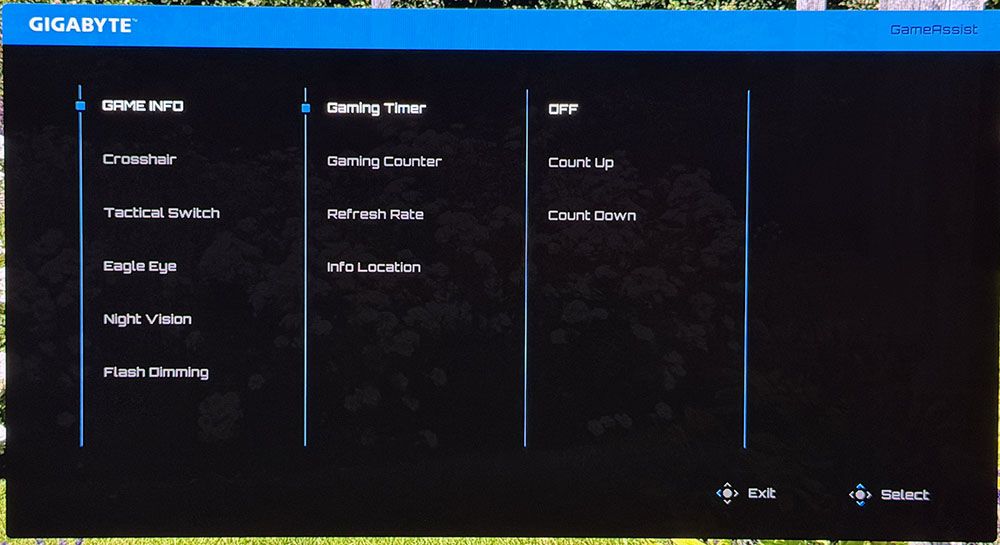
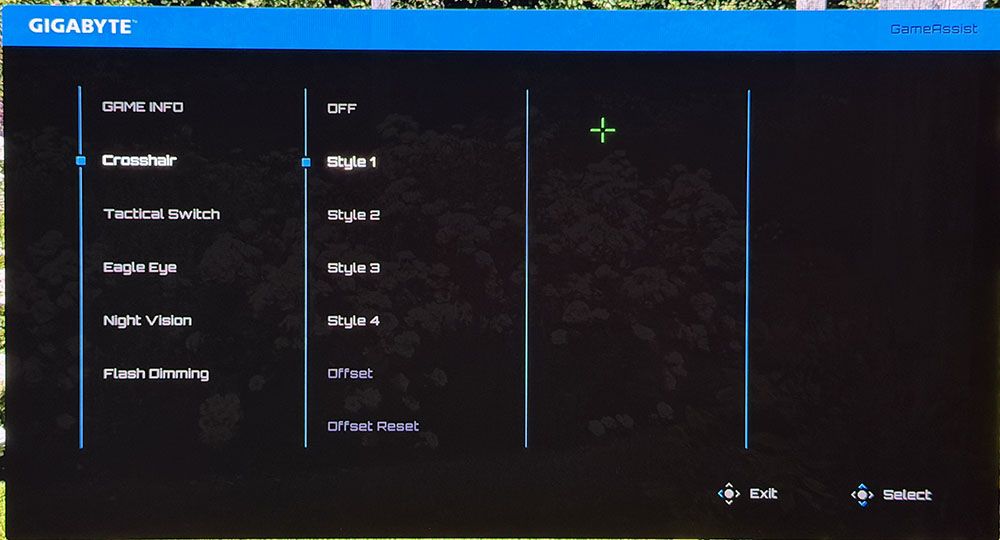
Press the joystick and click right for the Game Assist menu and its plethora of play aids. You get four crosshairs, a timer, stopwatch, refresh rate indicator, and positioning of the information window. Also included are sniper mode and night vision. Flash Dimming suppresses your weapon’s muzzle flash if that becomes a distraction.
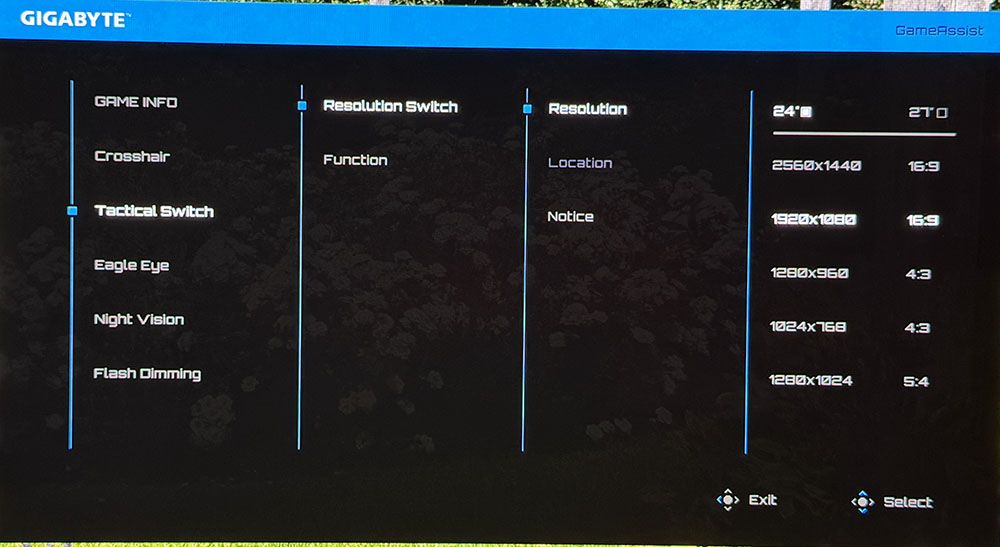
Gigabyte’s Tactical Switch is a unique feature that switches the MO27Q2A’s resolution on the fly. You can have FHD or HD in 16:9, 4:3, or 5:4 aspect ratios. The refresh rate remains at 280 Hz, but by shrinking the image, you get higher frame rates with no significant sharpness penalty.
Gigabyte MO27Q2A Calibration Settings
There isn’t much to the MO27Q2A’s calibration because it isn’t necessary. In fact, I could not improve my sample with calibration. It measures nearly perfect out of the box for D65, 2.2 gamma, and coverage of DCI-P3. The sRGB mode, which is also very accurate, is found in the picture mode list. For Adobe RGB, go to the Color Space sub-menu. For gaming and daily use, I settled on Standard mode, Native color space, and left everything else at default settings. My recommendations are below.
For HDR signals, HDR is the default mode, but I found the same excellent accuracy and high brightness in the Peak 1000 mode. It delivers the promised 1,000 nits for a 3% window, which in my tests equated to 445 nits for a 25% window pattern. You get a number of sliders for brightness and contrast, but they are not needed unless you want a different look for HDR content.
| Picture Mode | Standard |
|---|---|
| Brightness 200 nits | 75 (APL Stabilize Low) |
| Row 2 - Cell 0 | 40 (APL Stabilize High) |
| Brightness 120 nits | 41 |
| Brightness 100 nits | 33 |
| Brightness 80 nits | 25 |
| Brightness 50 nits | 13 (min. 22 nits) |
| Contrast | 50 |
| Gamma | 2.2 |
| Color Temp | Normal |
| Color Space | Native |
Picture Mode
Brightness 200 nits
75 (APL Stabilize Low)
40 (APL Stabilize High)
Brightness 120 nits
Brightness 100 nits
Brightness 80 nits
Brightness 50 nits
13 (min. 22 nits)
Gaming and Hands-on
A great way to evaluate a monitor’s HDR accuracy is by viewing static content that covers the full dynamic range of both color and neutral tones. Doom Eternal has such a screen in its HDR adjustment menu, and I use it for every review to verify detail rendering. The MO27Q2A showed every nuance in this torture test, which told me that it is very color accurate and tracks luminance correctly. In simple terms, you’ll see everything the game creators put in.
This gives gameplay a heightened sense of realism, especially in textures like stone, metal, and dirt. The MO27Q2A let me almost reach out and touch them. I had to remind myself that its resolution was QHD and Ultra HD because it rendered so finely. I also saw rich color that was perfectly balanced. You’ll see in the SDR and HDR tests that this is a seriously precise monitor.
Gameplay was up to the premium OLED standard with smooth motion that was completely free of blur. I had no trouble maintaining a constant 280fps. If you can’t hit that speed, Gigabyte includes Ultra Clear, which is a black frame insertion feature. It will remove motion blur at lower rates like 120 Hz. I noted that it was available at 280 Hz as well, which is unusual. It cuts brightness by around 40%, but you can partially compensate for that with the brightness slider. It operated artifact-free.
Another way to increase frame rates is with the Tactical Switch, which changes resolution and picture size on the fly. It doesn’t increase the refresh rate, but by shrinking the image, it maintains a favorable pixel map so that sharpness doesn’t take a huge hit.
Gameplay was addictive during my numerous frag fests. Input lag and response are super quick, which helped make my aim more precise. The MO27Q2A was so fast that it made me overconfident. I rushed into the melee rather than picking off enemies one by one. It was truly difficult to stop playing.
The MO27Q2A excels as an everyday screen with 109ppi pixel density in its 27-inch form factor. It’s significantly less expensive than an Ultra HD monitor if you can accept a small reduction in clarity. And that resolution is a sweet spot for frame rates. You won’t need a giga-hauler video card to achieve its full potential.
Accurate color out of the box meant I could rely on the MO27Q2A as a reference for graphics and photos. I found excellent results in my initial tests, and I could not improve upon them with adjustments. This monitor is pro-level for sure.
It’s impressive ergonomically too, with a solid all-metal stand and rugged panel construction. There are no missing features except for flashy LEDs. The internal speakers play loud and clear in the upper midrange, or you can plug in headphones. Users with a PC and console will appreciate the USB ports and KVM functions.
Takeaway: The MO27Q2A is a truly full-featured gaming monitor that can double as an everyday screen or a professional display. It games on par with the very best screens I’ve reviewed and delivers performance equal to more expensive OLEDs with higher refresh rates. It also matches those products in build quality with a solid stand and metal construction. For $399, you’ll be hard-pressed to find better.
MORE: Best Gaming Monitors
MORE: How We Test PC Monitors
MORE: How to Buy a PC Monitor
Current page: Features and Specifications

Christian Eberle is a Contributing Editor for Tom's Hardware US. He's a veteran reviewer of A/V equipment, specializing in monitors. Christian began his obsession with tech when he built his first PC in 1991, a 286 running DOS 3.0 at a blazing 12MHz. In 2006, he undertook training from the Imaging Science Foundation in video calibration and testing and thus started a passion for precise imaging that persists to this day. He is also a professional musician with a degree from the New England Conservatory as a classical bassoonist which he used to good effect as a performer with the West Point Army Band from 1987 to 2013. He enjoys watching movies and listening to high-end audio in his custom-built home theater and can be seen riding trails near his home on a race-ready ICE VTX recumbent trike. Christian enjoys the endless summer in Florida where he lives with his wife and Chihuahua and plays with orchestras around the state.