 Newshot
Tom's Hardware Verdict
MSI's EdgeMesa N AI+ mini PC brings Nvidia RTX Spark power to a Windows on Arm desktop. It offers broad app compatibility and the same strong local AI performance we've come to expect from Nvidia's GB10 SoC, but it's still very expensive and less expandable than DGX Spark systems.
Reasons to buy
- +Solid local AI performance for LLMs and image generation, as expected
- +Familiar Windows 11 user experience and app compatibility
- +Can game in a pinch
Reasons to avoid
- -Eye-poppingly expensive
- -Could use more peripheral I/O and smarter port placement
- -Loses the DGX Spark's clustering capability
- -Getting the best gaming performance requires patience
Why you can trust Tom's Hardware Our expert reviewers spend hours testing and comparing products and services so you can choose the best for you. Find out more about how we test.
- CPU and local AI performance
- Gaming performance and the tuning experience
- Power draw and noise levels
Nvidia’s RTX Spark platform, powered by the RTX Spark N1X SoC, passed its most difficult test yet last month at the heart of Windows on Arm laptops. Now we get to see how that chip serves as a Windows on Arm foundation for compact desktops.
We’ve got our hands on the MSI EdgeMesa N AI+, a $7,500 RTX Spark mini PC that gives Windows-native creators and local AI trailblazers access to the same powerful 6144-core Blackwell GPU and 20-core Arm CPU that we recently put to the test in the Surface Laptop Ultra, along with a 128GB pool of unified memory and 4TB of storage in our tested config.
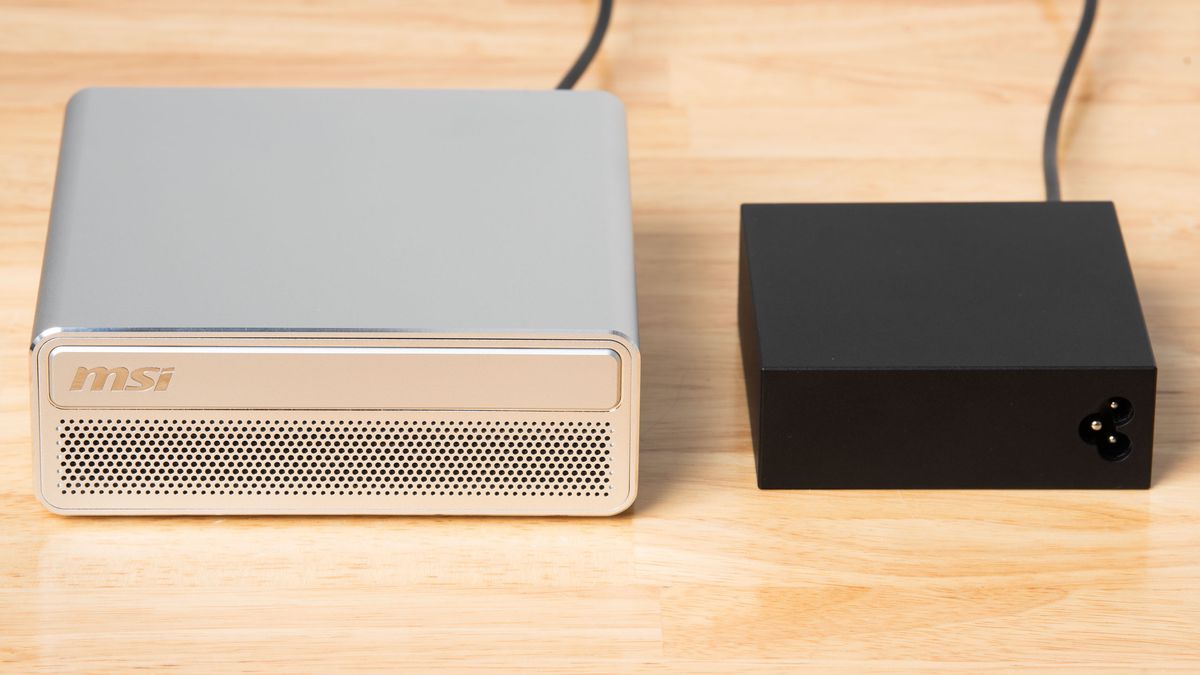
We’ve been testing Nvidia GB10-powered desktop systems for almost a year now in the form of the DGX Spark and friends, and the EdgeMesa N AI+’s design is typical of the breed. It’s wrapped in a slightly hollow-feeling matte aluminum shell with shiny diamond-cut edges and a white plastic back plate.
The design and build quality of this system is a tad underwhelming for the price. It feels nice enough, but It’s hardly a precision-milled statement piece for your desk like a Mac Mini or Mac Studio.
The EdgeMesa draws cool air in through its perforated front panel, which then passes through a dual-fan heatsink with a vapor-chamber base and exhausts through the back panel. The rounded rectangle on the top half of the front panel might look like an optical drive tray, but it’s a purely cosmetic accent.
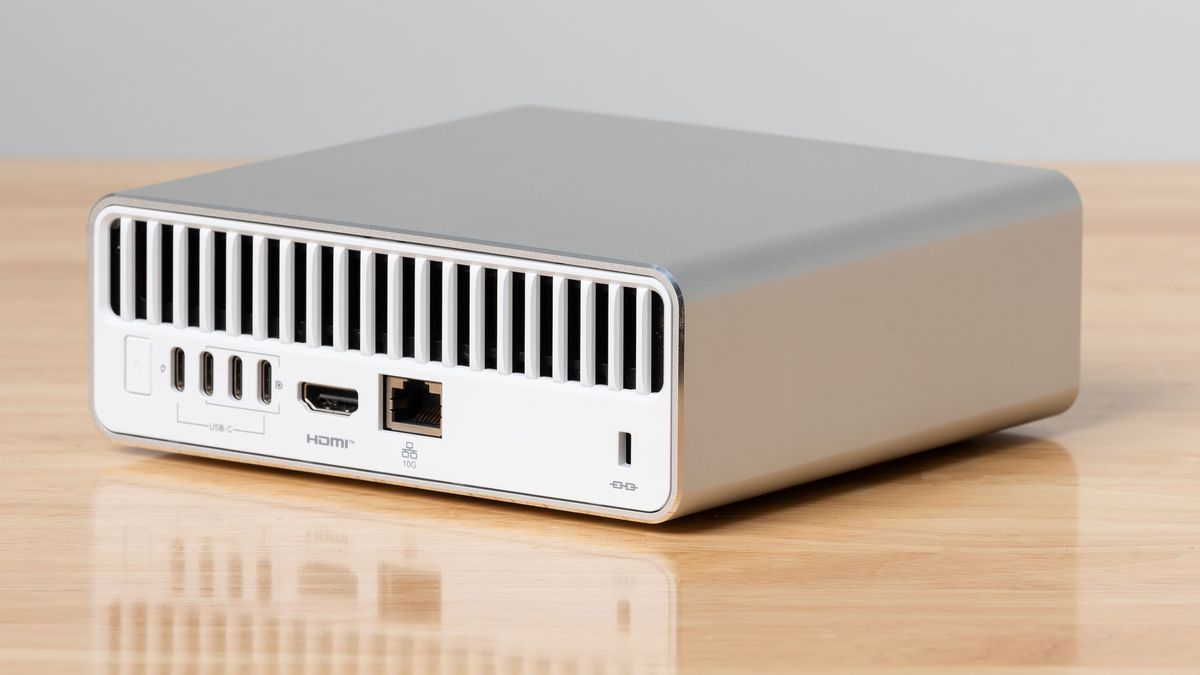
Around back, the EdgeMesa comes equipped with a 10 Gigabit Ethernet jack, an HDMI 2.1 port, and three USB Type-C 20 Gbps ports with DisplayPort Alt Mode support. A fourth USB-C port is dedicated to the system’s 240 W USB-PD power adapter. The EdgeMesa also has Wi-Fi 7 and Bluetooth 5.4 radios inside.
Even with a wireless keyboard and mouse, three 20Gbps USB-C ports feel a bit skimpy as the sole expansion options on a $7,499 PC that’s positioned as a do-it-all desktop for content creation and gaming. If you need to connect multiple monitors to an RTX Spark via USB-C, those scant options for peripheral connectivity shrink even further.
Get Tom's Hardware's best news and in-depth reviews, straight to your inbox.
For comparison, a similarly priced Mac Studio gives you four 80Gbps Thunderbolt 5 ports around back and two more USB Type-C ports, plus an SD card reader, up front. The Mac even provides a headphone jack, while the EdgeMesa requires you to plug in a USB headset or DAC or pair Bluetooth earbuds for audio output.
Even the Mac Mini gives you three Thunderbolt ports out back and two USB 3 10Gbps ports out front.
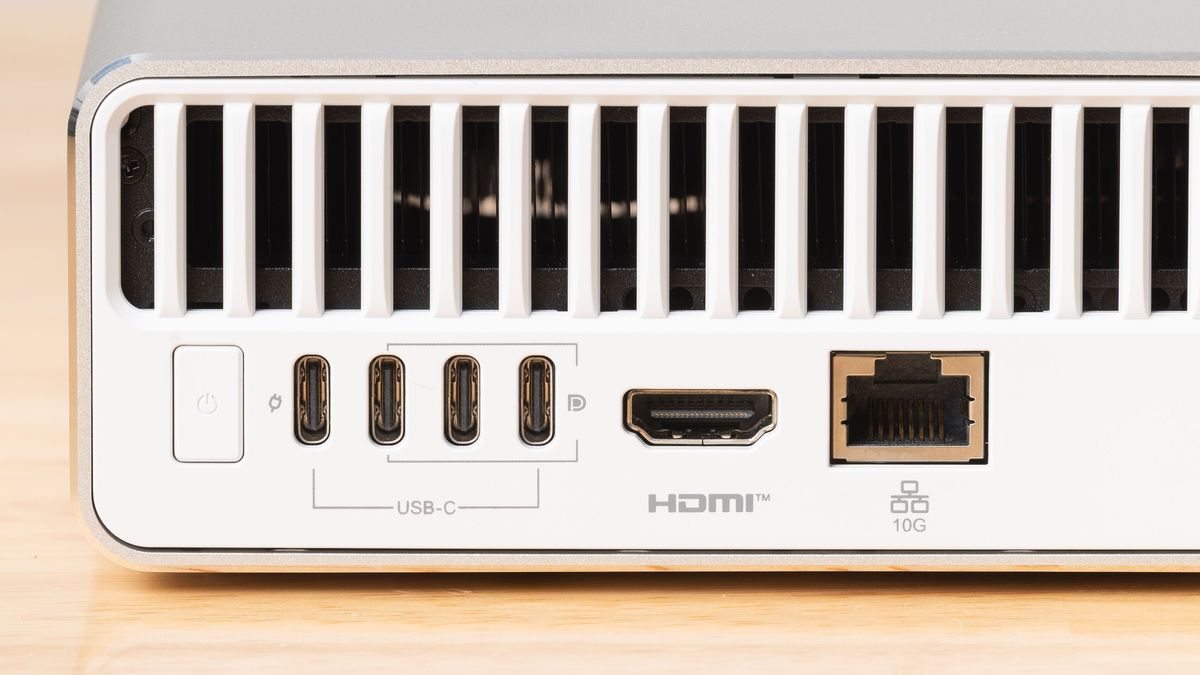
In use, the tightly spaced, rear-mounted USB-C ports make for an annoying time when doing frequent unplugging and replugging of devices like card readers and external SSDs that are typical in creative workflows. Even one front-panel USB-C port would have made a huge difference in the ease of use of this design.
The EdgeMesa also drops the handy ConnectX RDMA NIC that lets you cluster DGX Spark systems together to run larger AI models. That omission raises a weighty question: is Windows support and application compatibility important enough to trade away any chance of expanding your local AI foundation in the future?
Having tested DGX Sparks for some time now, I’m not sure that’s a wise trade-off, given that most anybody reading this already has a capable Windows PC or Mac that can link up with a DGX Spark for many local AI compute jobs using the Nvidia Sync app.
DGX Spark prices are rising, but you can get MSI's own EdgeXpert with 128GB of memory and a 4TB SSD on sale for $8,099 right now (or $8,499 at full price). Even a $1000 difference in price for that ConnectX NIC in this rarefied air of PC pricing would give me pause if I'm seriously considering how to add local AI capacity to my home.
If you have no inclination whatsoever to learn Linux or networking concepts and just want a no-questions-asked, AI-capable Windows mini PC that can serve as your primary desktop, an RTX Spark system like this may be the way to go. But you'll want to be really sure of your decision before dropping this much cash.
| CPU | 20-core Arm CPU (10 X925 performance cores, 10 A725 efficiency cores) |
|---|---|
| GPU | 6144-core (48 SM) Nvidia Blackwell integrated GPU |
| Memory | 128GB LPDDR5X, 273 GB/s shared memory bandwidth |
| Storage | 4TB NVMe SSD |
| Networking and wireless | 10 Gigabit Ethernet, Wi-Fi 7, Bluetooth 5.4 |
| Expansion | 3x USB 3.2 Gen 2x2 Type-C ports (rear) |
| Power Supply | 240 W USB-C PD |
| Operating System | Windows 11 Pro |
| Price as Configured | $7,499.99 |
20-core Arm CPU (10 X925 performance cores, 10 A725 efficiency cores)
6144-core (48 SM) Nvidia Blackwell integrated GPU
128GB LPDDR5X, 273 GB/s shared memory bandwidth
4TB NVMe SSD
Networking and wireless
10 Gigabit Ethernet, Wi-Fi 7, Bluetooth 5.4
3x USB 3.2 Gen 2x2 Type-C ports (rear)
Power Supply
240 W USB-C PD
Operating System
Windows 11 Pro
Price as Configured
CPU and local AI performance
The performance of the Nvidia GB10 SoC's CPU and GPU resources, whether under DGX OS or Windows, is well-trodden ground by this point. But for a fresh point of comparison, we grabbed AMD’s Ryzen AI Halo, swapped in a spare SSD, and installed Windows 11 Pro, as the Ryzen AI Halo is the only other Windows-ready platform with a large unified memory pool for AI adventurers.
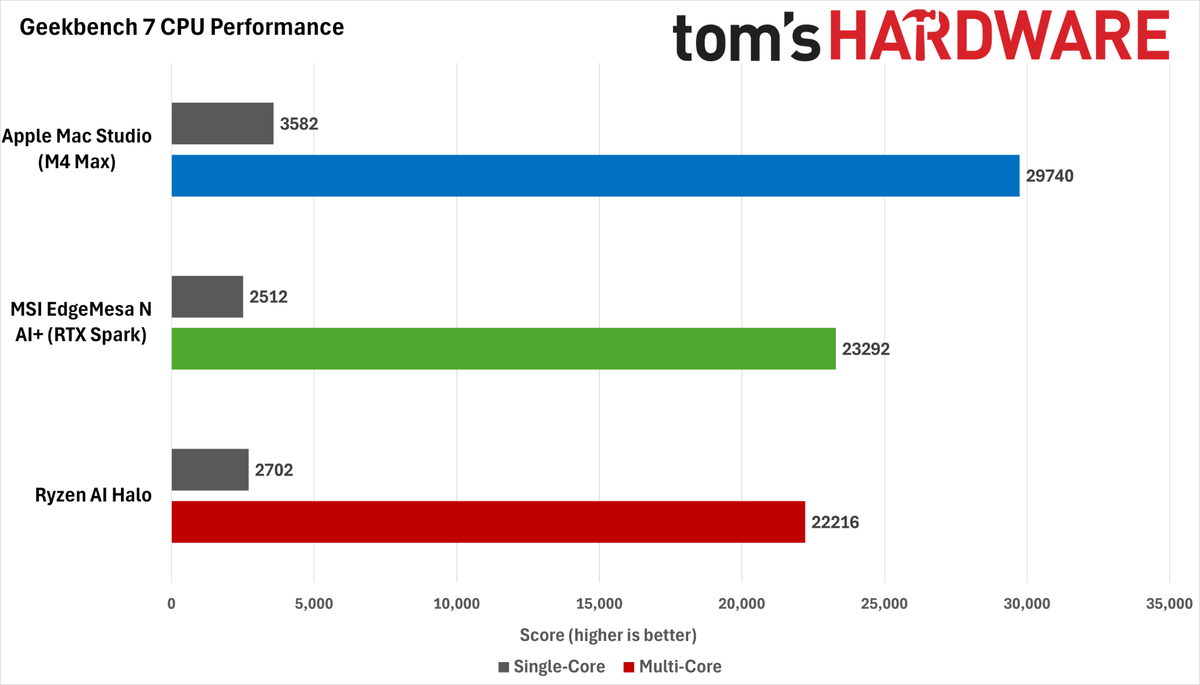
In the Geekbench 7 CPU benchmark under Windows, the Ryzen AI Halo delivers a slightly higher single-threaded score than the MSI EdgeMesa’s RTX Spark Superchip, but its multithreaded score trails the Nvidia part. Using Linux, we would expect both scores to be higher for the Ryzen CPU. But the broader point remains the same: you can expect similar performance from both of these CPUs under Windows.
We’ve left Apple’s Mac Studio with M4 Max in these charts just to emphasize the large performance lead Apple Silicon holds in this benchmark, even with older chips. The current M5 Max would likely open an even larger lead.
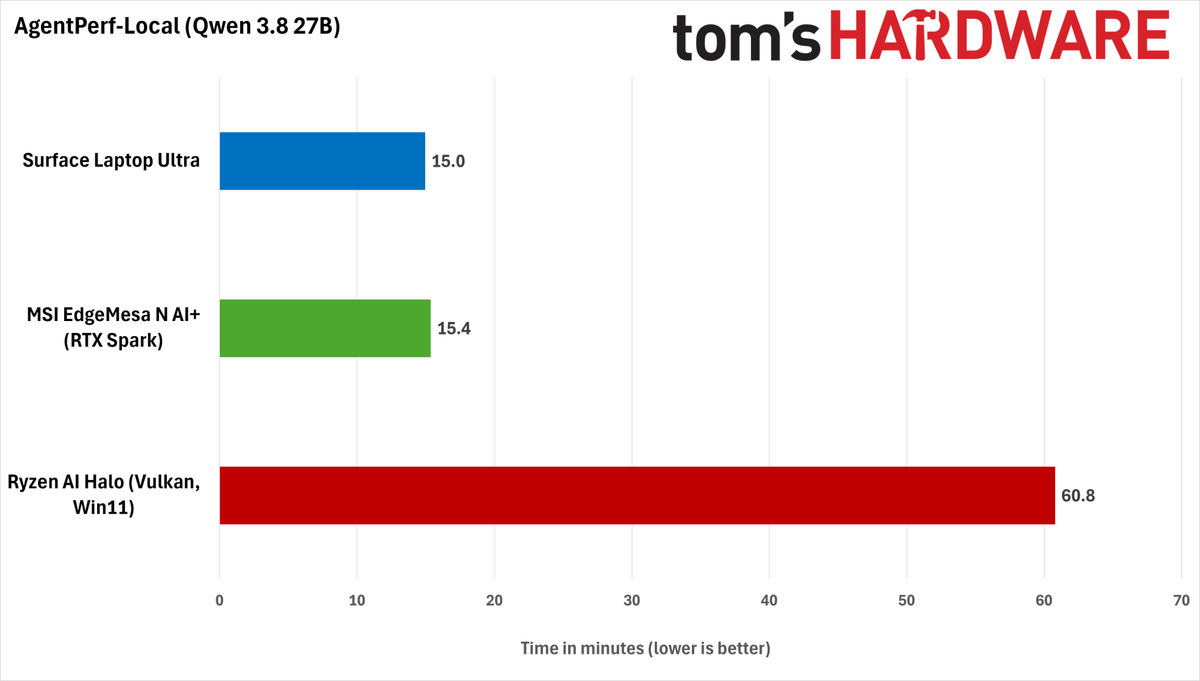
In the AgentPerf-Local AI inference benchmark, the MSI EdgeMesa delivered performance practically identical to Microsoft’s Surface Laptop Ultra when running the same Qwen 3.8 27B model with DFlash2 speculative decoding. Its desktop form factor doesn’t seem to give it any extra performance headroom, at least for this LLM serving configuration. Other workloads or models could reveal a difference.
We already tested the RTX Spark against the Ryzen AI Halo in AgentPerf-Local in our Surface Laptop Ultra review, and AMD’s platform ended up way behind GB10 in those tests. And in this new round of testing, AMD's LLM performance is worse under Windows with the Vulkan backend than in Linux with ROCm, taking a whopping four times as long as the EdgeMesa to complete the benchmark.
Strix Halo might have been an appealing local inference option when it was the only open and relatively hackable unified memory platform around, but if you’re serious about local AI performance (and especially if tokens equal dollars for you), a GB10 system is the superior choice in late 2026.
Gaming performance and the tuning experience
Gaming on RTX Spark continues to be a bit of a weird time, and the MSI EdgeMesa N doesn’t change that experience, even with a more generous power and thermal budget than the Surface Laptop Ultra I've already tested.
This platform just doesn’t respond to tuning as we might expect from our experience with traditional gaming PCs and laptops. That weirdness stems, in part, from the imbalance between memory bandwidth and compute resources on GB10.
The 48 SMs of the RTX Spark N1X GPU have to share just 273 GB/s of LPDDR5X bandwidth with the CPU. Compare that with the 672 GB/s of dedicated bandwidth the similarly-specced RTX 5070 enjoys from its 12 GB of GDDR7.
Architectural decisions aside, the RTX Spark platform's gaming performance isn't helped by the fact that full GPU utilization is seemingly hampered by the overhead of Prism x86 emulation in most games. Few (if any) major titles have Arm ports, so this is just a fact of life for the foreseeable future if you buy one of these systems.
Let's see how this all plays out in practice for the RTX Spark versus the Radeon 8060S on board AMD's Strix Halo.
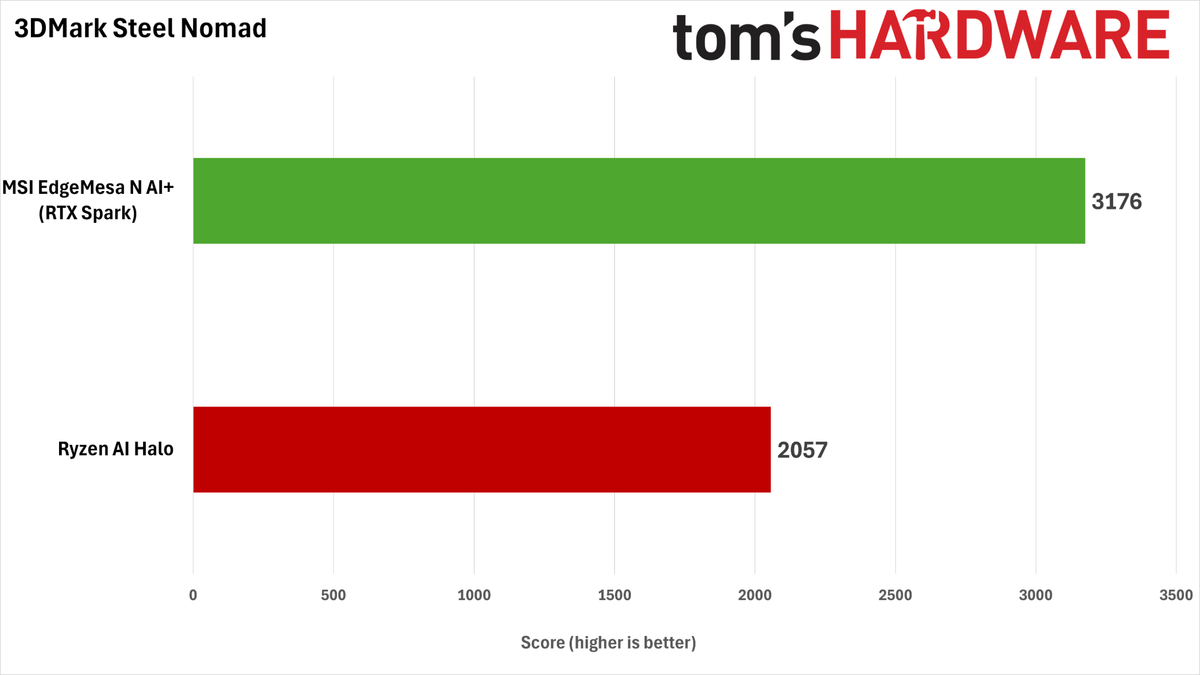
In the 3DMark Steel Nomad raster benchmark, the RTX Spark holds a wide lead over the Ryzen AI Halo, delivering a roughly 56% higher score. That result would suggest a knockout in games for Nvidia’s platform.
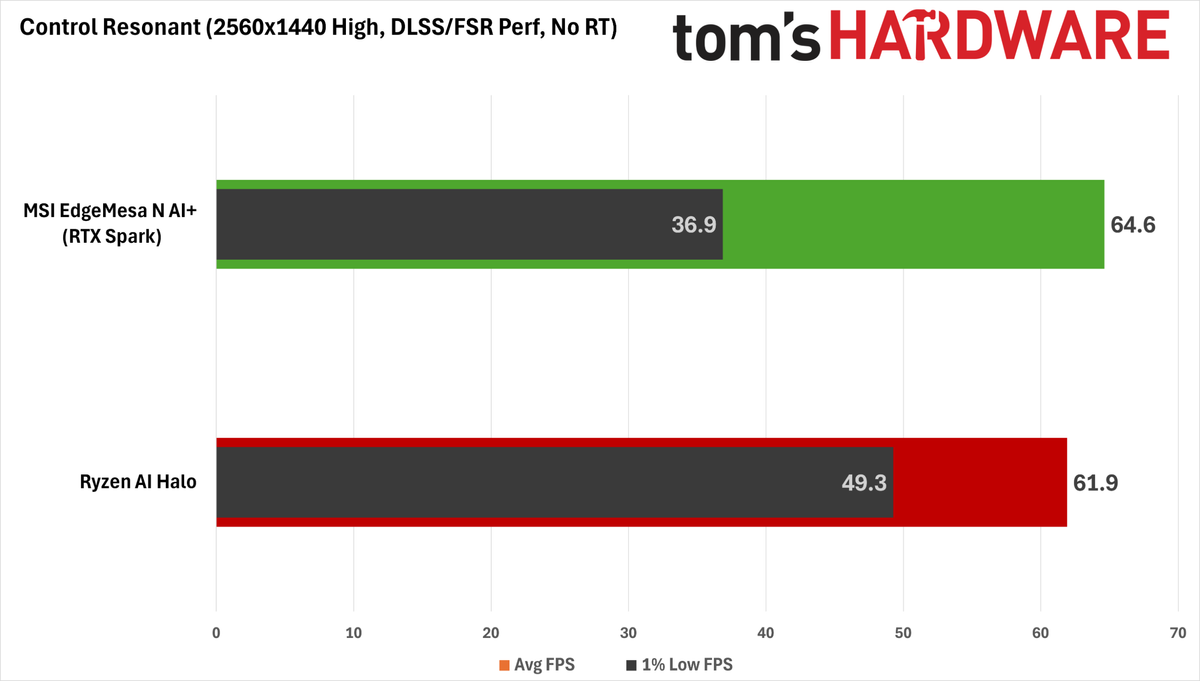
But Steel Nomad isn’t representative of real-world gaming performance on the RTX Spark. If we fire up Control Resonant on both platforms and choose the High raster preset at 1440p with Performance upscaling (a 1280x720 input resolution), the RTX Spark and Strix Halo end up a lot closer.
Notably, though, the RTX Spark desktop delivers considerably worse 1% low FPS performance than the Ryzen AI Halo, and this does manifest as visible stutter and hitching. So it's not a clear win for the Nvidia platform.
AMD fans might take heart in the fact that Strix Halo can get this close to the RTX Spark on this raster gaming baseline, but the Radeon 8060S doesn’t have nearly as many tricks up its sleeve to further juice performance.
For one, the quality of FSR 4 upscaling at lower input resolutions on RDNA 3.5 is still not up to par with what you can get out of DLSS 4.5. For two, the Radeon 8060S’s RDNA 3.5 CUs don't match up well against the Spark's Blackwell-powered RT chops.
And FSR Frame Generation is still limited to a doubling of a base frame rate, so you can’t smooth out gameplay on a high-refresh-rate monitor nearly as well as you can with DLSS MFG.
So even if their raster baseline frame rates are similar, the Radeon 8060S isn't delivering the same image quality in Control Resonant as an RTX Spark system does with all its DLSS features in play.
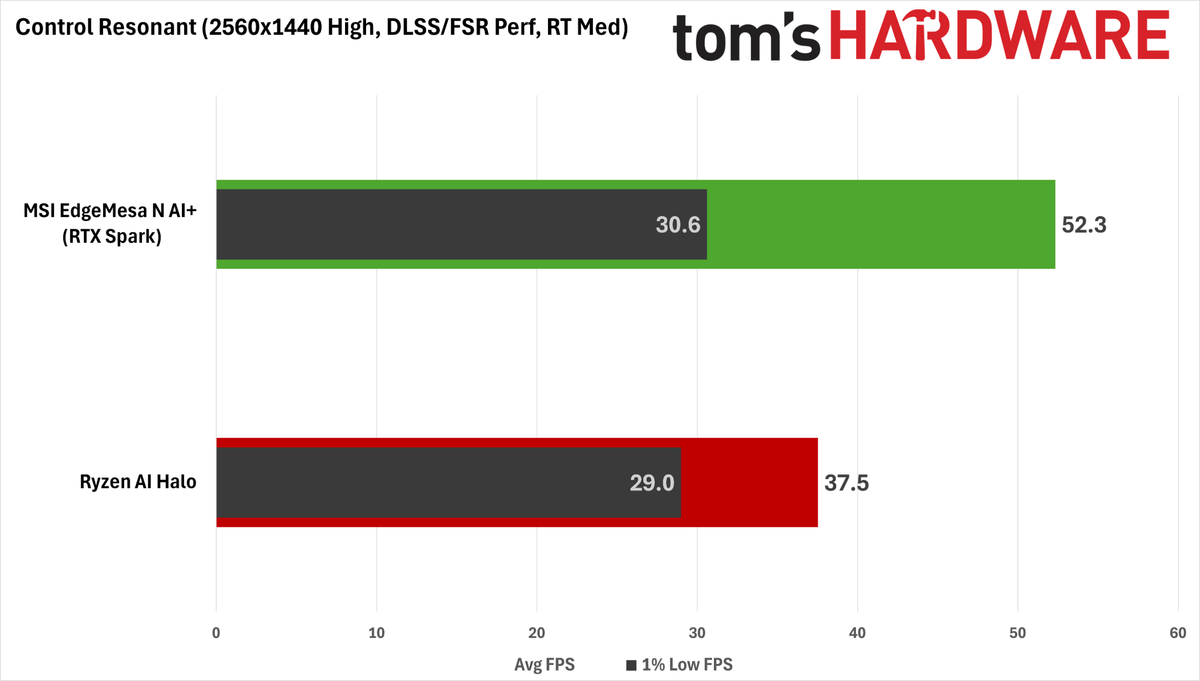
RT is the next step for squeezing better image quality out of Control Resonant. Surprisingly, enabling RT Medium only results in a 14% performance hit on the Spark versus 38% on the AI Halo. That might be due in part to the efficiency of DLSS Ray Reconstruction versus the Northlight engine's built-in denoiser, but the RT prowess of Blackwell certainly can't hurt.
A 52.3 FPS average with a 75 ms average PC latency is an OK baseline — at least in the context of an RTX Spark system — for adding MFG to the mix for a smoother experience, especially since Control Resonant seems to link Nvidia Reflex latency reduction to that tech anyway. But dialing in MFG 3X with the default MFG Preset B model still results in a PC latency of 96 ms on average, which is too high to be enjoyable, even if we give the Spark some slack.
I found that the new MFG Preset C, available through the Nvidia App, significantly lowered latency versus the more compute-intensive Preset B. While input latency with Preset C is still high at about 84 ms, we have to take every bit of help we can get here, and the resulting 145 FPS average is notably smoother than native gameplay on my 160 Hz monitor.
We only had time to dive into this one title in our testing, but when Nvidia says the RTX Spark platform is great for 1440p gaming, our experience suggests that you need to be ready to tweak DLSS upscaling and dial in MFG for more demanding games. And look: that’s fine. These are proven technologies at this point, and they let us get a better experience out of this platform than native rendering would allow.
But all of these data points should go to show that if you're used to the low input latency and predictable performance scaling characteristics of an x86 desktop gaming PC with a discrete GPU, the RTX Spark platform still has a ways to go before it can truly replace such a system.
Power draw and noise levels
During our AgentPerf-Local LLM benchmark, the EdgeMesa N AI+ pulls about 140 W from the wall, and under that load, it produces just 38.2 dBA at 18” (46 cm) according to our calibrated SPL meter, well below the 47.4 dBA of the RTX Spark-powered Surface Laptop Ultra and the 48 dBA of the Ryzen AI Halo.
That makes the EdgeMesa an easy system to live with for local AI work, especially if it’s moonlighting as an AI inference server or always-on agent host in shared spaces.
Under gaming workloads, the EdgeMesa draws about 200 W. With more heat to dissipate, the MSI box’s noise output rises to 40.7 dBA, which is still much quieter than the average gaming laptop and will easily be covered by speakers or a closed-back gaming headset.
The Ryzen AI Halo, on the other hand, emits a piercing 46.9 dBA whine while gaming, much closer to what we expect from a gaming laptop. And that’s not because it has that much more heat to dissipate; the AI Halo is pulling about 209 W with Control Resonant running.
Under that same load, the EdgeMesa’s fans have a slightly high-pitched character to them, but it’s much less pronounced than the typical gaming laptop. Mostly, the sound from the system is that of air moving, and it's easy to ignore (so much so that I missed the aural cues I sometimes listen for when a benchmark finishes).
MSI deserves high praise for this system’s thermal design and cooling system. It’s both quiet and pleasant-sounding, and those factors aren’t always a given with mini PCs.
Bottom line
If you’re a hardcore Windows fan who’s been intrigued by Nvidia’s DGX Sparks for local AI, but you've been repelled by the idea of using Linux, RTX Spark desktops like this MSI EdgeMesa N AI+ finally pair your preferred OS with the same 6144-core Nvidia Blackwell GPU, 20-core Arm CPU, and up to 128GB of unified memory that give those systems their local AI grunt.
These systems are a potentially exciting prospect for those who want to explore the possibilities of local AI and agentic workflows without the privacy and token caps of cloud models, all from the comfort of Windows.
But that potential comes with tradeoffs that you’ll need to weigh carefully before buying. And at an eye-popping $7,499 for the 128GB EdgeMesa configuration with a 4TB SSD that we tested, those tradeoffs weigh all the more heavily.
The MSI EdgeMesa N AI+ delivers essentially the same performance from the RTX Spark N1X SoC (aka GB10) we’ve come to know and love for about a year now. It’s reasonably fast for local LLM inference, and it offers leading performance with generative AI workflows like images and videos in ComfyUI. Its Arm CPU offers solid enough single-threaded and multi-threaded performance for general computing tasks, and it can game in a pinch. The EdgeMesa is laudably quiet, too — no small feat for a compact PC like this.
But in exchange for Windows support, RTX Spark desktops lose the valuable expandability offered by the ConnectX 7 RDMA NIC that comes standard on DGX Spark boxes. So if you want to try your hand at running a bigger, more intelligent LLM than you can fit in one of these systems’ unified memory pools through clustering, you are forever out of luck if you go down the RTX path.
Even if you can live without the ConnectX NIC, we’re a bit let down by the peripheral connectivity the EdgeMesa N AI+ offers, both for its price and for its ambitions as a do-it-all creator and gaming system.
With just three 20 Gbps USB Type-C ports on the back panel that have to do double duty as display outputs in multi-monitor setups, folks who have to juggle external storage and card readers frequently may find both the number and placement of those ports an obstacle to a smooth workflow. We really would have liked to see more expansion ports on this system overall, or at least one on the front panel.
Nvidia loves to tout the gaming capability of Windows on Arm with RTX Spark systems, but we're still not that impressed by the experience in practice, especially for a system this expensive.
It's nice that you can enjoy PC gaming on these systems at all, but even in a desktop with more power and thermal budget to spare, the gaming performance and responsiveness we saw can only be described as adequate. We were especially surprised by the gulf in 1% low FPS between the RTX Spark and the much cheaper Ryzen AI Halo in Control Resonant, despite the RTX Spark N1X's much stronger GPU on paper.
In general, we find that it takes a lot of careful tweaking and application of DLSS magic to get around this platform's wrinkles for gaming (or a willingness to just let the Nvidia App optimize your game settings). In other words, don't retire your dedicated gaming PC or laptop just yet.
The large memory pools available from RTX Spark systems have uses beyond local AI, of course. Nvidia GPUs are favorites for creative work on Windows, and if you work with massive 3D or game development projects, or you edit lots of high-resolution video, RTX Sparks are the first unified memory systems to pair a powerful Nvidia GPU with this much VRAM for Windows users.
Adobe just updated several of its Creative Suite apps with Arm-native versions, so if you’re trying to blaze the trail of agentic content creation and generation in this modern age, an RTX Spark desktop (or laptop, for that matter) might be intriguing.
But we feel like $7,499 is still a ton of money to spend on a system like this to run Adobe's apps specifically, unless a large unified memory pool is particularly useful for your work today.
All told, we're left scratching our heads a bit about who RTX Spark desktops are really for. RTX Spark laptops meaningfully expanded the capabilities of mobile Windows on Arm systems thanks to the unmatched AI compute resources of their Blackwell GPUs and support for the full Nvidia software stack, along with solid CPU performance and battery life.
But compared to both the existing DGX Spark platform and other mini PCs, RTX Spark desktops like the MSI EdgeMesa N AI+ ask you to give up a lot in exchange for the Nvidia-powered Windows on Arm experience, especially for the high prices they’re likely to command amid the current silicon supply crunch.
If you’re a hardcore Windows-native developer or creator looking to explore the boundaries of what’s possible from local and agentic AI and want the best possible Microsoft-powered foundation for those activities, an RTX Spark desktop might be the right choice for the job, assuming you have the cash.
But if you're just curious, we'd wait for the value proposition of local or agentic AI under Windows to firm up a bit and for the prices of these systems to come down before spending thousands of dollars on a still-fuzzy vision of the future of computing.

As the Senior Analyst, Graphics at Tom's Hardware, Jeff Kampman covers everything that has to do with graphics cards, gaming performance, and more. From integrated graphics processors to discrete graphics cards to the hyperscale installations powering our AI future, if it's got a GPU in it, Jeff is on it.