 Newshot
Use AI foryour work.Share fewerprivate details.
LegisComply works inside ChatGPT and other popular AI chats, helping you review sensitive information before you send.
Get help with your work. Stay in control of what you share.
A real moment. A little more control.
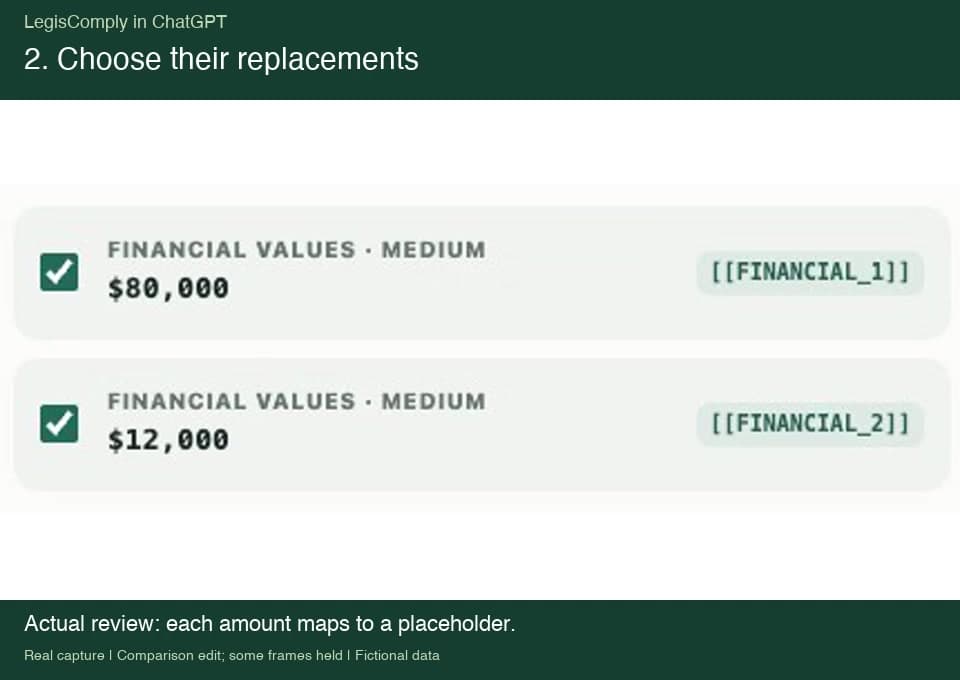
A fictional supplier proposal includes $80,000 for implementation and $12,000 per year for support. This comparison edit shows the original-message view, the actual review mappings, and a six-second close-up of the protected message with both amounts replaced by tokens. Some frames are held for readability. ChatGPT’s actual two-bullet summary displays both original amounts locally. The vendor name, Northstar, was not detected and remains unchanged.
Recorded with local build 0.5.15; the store version may differ. This recording shows the visible workflow, not a network-level verification. Typed text and restored values may be accessible to AI-site scripts.
Review sensitive details in a supplier proposal before asking ChatGPT for help.
One extension. Your favorite AI.
- Microsoft Copilot
Independent extension. No affiliation with or endorsement by these providers.
For the things you already ask AI
The task needs context.It may not need every detail.
Client work
“Help me think through this proposal.”
Get a second perspective while reviewing which client names and commercial details you want to share.
Inside your business
“Turn these meeting notes into a plan.”
Keep the useful discussion. Check the people, figures, and internal details before sending it to AI.
Everyday questions
“Help me understand this document.”
Ask for a clearer explanation while choosing which personal details to leave out.
Right inside your AI chat
A small pause.A more thoughtful send.
No new workspace to learn. Keep using the AI you know.
Follow the extension setup guide →
- 01Add it. Turn it on.Install LegisComply in Chrome, open its menu, and enable protection. You decide when it starts.
Add it. Turn it on.
Install LegisComply in Chrome, open its menu, and enable protection. You decide when it starts.
- 02Check the details.As you work with prompts and supported files, LegisComply checks for sensitive information. Review suggestions and choose what to replace.
Check the details.
As you work with prompts and supported files, LegisComply checks for sensitive information. Review suggestions and choose what to replace.
- 03Continue the conversation.Selected details are replaced for the AI. LegisComply can put recognized details back in the answer you see, so it stays readable.
Continue the conversation.
Selected details are replaced for the AI. LegisComply can put recognized details back in the answer you see, so it stays readable.
Control, with clear limits
Your details deserve a clear explanation.
Checks happen on your device. Your prompts and files aren’t sent to LegisComply.
Always review what you share. Detection can miss details, and AI sites may read text typed into their pages before protection is applied.
Before you get started
A few goodquestions.
It works inside supported AI chats to check prompts and supported files for potentially sensitive details. Selected details are replaced before sending, and recognized details can be restored in the answer you see.
ChatGPT, Claude, Gemini, Perplexity, and Microsoft Copilot in Chrome. Add the extension and enable protection from its menu.
The Chrome extension is free to use. You don’t need a LegisComply account. Your AI provider may require its own account or subscription.
No. Detection can miss information, and only you know the full context. Review what you share. AI-site scripts may read text entered into their pages and details restored for you to read.
Your prompts, files, and saved text mappings are processed locally and aren’t sent to LegisComply. The AI service you use has its own data-handling practices.
Yes. Use the separate browser tool below to prepare text, copy your reviewed version into AI, and bring the reply back to restore recognized details. Keep the tool’s tab open.
Your AI. Your choice of what to share.
Bring your work.Be thoughtful with the details.
Another way to get started
Try it here.No installation.
Prepare text in this separate browser tool, then copy your reviewed version into your AI chat.
This is a separate workflow from the extension. Keep this tab open if you want to restore details in the answer.
- 1Add content
- 2Review details
- 3Use with AI
- 4Restore answer
Word import and export are different. We can read text from DOCX files, but many ordinary Word files cannot be exported as a protected DOCX. Protected TXT is available without the original layout, images, or comments. See format limits.
Follow the text and document walkthrough (opens in a new tab)
Watch a sample contract turn into protected text. No upload needed.
OpenAI, ChatGPT, and the OpenAI logo are trademarks of OpenAI. Claude is a trademark of Anthropic. Gemini is a trademark of Google LLC. Perplexity is a trademark of Perplexity AI, Inc. Microsoft and Microsoft Copilot are trademarks of the Microsoft group of companies.