 Newshot
- Ivor Hewitt @Edent nicely done Reply | Reply to original comment on social.ivor.org 2026-11-09 12:44
Ivor Hewitt
@Edent nicely done
Reply | Reply to original comment on social.ivor.org 2026-11-09 12:44
- Jonathan B ✈️🪄👨🏻💻 @Edent nice! Definitely something I’m going to investigate. I’m thinking the same approach could be done at the Caddy server level or even by a fail2ban plugin monitoring for the url in logs… Reply | Reply to original comment on mastodon.me.uk 2026-11-09 12:49
Jonathan B ✈️🪄👨🏻💻
@Edent nice! Definitely something I’m going to investigate.
I’m thinking the same approach could be done at the Caddy server level or even by a fail2ban plugin monitoring for the url in logs…
Reply | Reply to original comment on mastodon.me.uk 2026-11-09 12:49
- 210561 ✨ [Q] @Edent I very much enjoy how obvious this is in hindsight; quite clever! Reply | Reply to original comment on glauca.space 2026-11-09 13:00
210561 ✨ [Q]
@Edent I very much enjoy how obvious this is in hindsight; quite clever!
Reply | Reply to original comment on glauca.space 2026-11-09 13:00
- vramvoolenaar @Edent I hate to think of future web surfers getting snagged in all the barbed wire were leaving in the waves. Watching the internet burn was not on my bucket list. Reply | Reply to original comment on mastodon.nlmakers.ca 2026-11-09 13:06
vramvoolenaar
@Edent I hate to think of future web surfers getting snagged in all the barbed wire were leaving in the waves. Watching the internet burn was not on my bucket list.
Reply | Reply to original comment on mastodon.nlmakers.ca 2026-11-09 13:06
- Ryan @blog hey if it works ... it seems like a pretty elegant solution to me. Instead of going to .htaccess, I wonder if pushing it to fail2ban would work too. Like let that handle tracking and dropping ban times. Reply | Reply to original comment on mastodon.social 2026-11-09 13:12
Ryan
@blog hey if it works ... it seems like a pretty elegant solution to me. Instead of going to .htaccess, I wonder if pushing it to fail2ban would work too. Like let that handle tracking and dropping ban times.
Reply | Reply to original comment on mastodon.social 2026-11-09 13:12
- Ben Curthoys IIS / C# version. Here I'm just dumping the bad IP addresses in a txt file. The IIS process doesn't have write access to the config that actually blocks them, so there's a separate process that runs a powershell script every 5 minutes and checks the blockfile. using System; using System.IO; using System.Linq; using System.Net; using System.Web; namespace Root { /// Summary description for badbot public class badbot : IHttpHandler { public void ProcessRequest(HttpContext context) { string ipAddress = GetClientIpAddress(context.Request); if (!String.IsNullOrEmpty(ipAddress)) { string path = context.Server.MapPath("~/App_Data"); Directory.CreateDirectory(path); string filename = Path.Combine(path, "badbots.txt"); lock (typeof(badbot)) { File.AppendAllText(filename, $"{ipAddress}{Environment.NewLine}"); } context.Response.ContentType = "text/plain"; context.Response.Write("This page is mentioned only from robots.txt telling you not to be here. The only way you could get here is if you read robots.txt telling robots not to go here, and deliberately ignored it. So now your IP address is going to be blocked. If you are a human, that was silly of you."); } } public static string GetClientIpAddress(HttpRequest request) { // AWS ALB, nginx, ARR, etc. string xForwardedFor = request.Headers["X-Forwarded-For"]; if (!string.IsNullOrWhiteSpace(xForwardedFor)) { string firstIp = xForwardedFor .Split(',') .Select(ip => ip.Trim()) .FirstOrDefault(); if (IPAddress.TryParse(firstIp, out _)) { return firstIp; } } // Cloudflare (if you ever adopt it) string cloudflareIp = request.Headers["CF-Connecting-IP"]; if (!string.IsNullOrWhiteSpace(cloudflareIp) && IPAddress.TryParse(cloudflareIp, out _)) { return cloudflareIp; } // Direct IIS connection string userHostAddress = request.UserHostAddress; if (!string.IsNullOrWhiteSpace(userHostAddress) && IPAddress.TryParse(userHostAddress, out _)) { return userHostAddress; } return null; } public bool IsReusable { get { return false; } } } } powershell: function ban-badbots { $existingIps = [System.Collections.Generic.HashSet[string]]::new( [System.StringComparer]::OrdinalIgnoreCase ) Get-WebConfiguration -Filter "/system.webServer/security/ipSecurity/add" | ForEach-Object { if ($_.ipAddress) { [void]$existingIps.Add($_.ipAddress) } } foreach ($customerFolder in (Get-ChildItem -Path $installPath -Directory)) { $file = Join-Path $customerFolder.FullName "Root\App_Data\badbots.txt" if (-not (Test-Path $file)) { continue } Write-Host "Processing $file" $success = $true $added = 0 try { foreach ($ip in (Get-Content $file)) { $ip = $ip.Trim() if ([string]::IsNullOrWhiteSpace($ip)) { continue } $parsedIp = $null if (-not [System.Net.IPAddress]::TryParse($ip, [ref]$parsedIp)) { Write-Warning "Invalid IP '$ip'" continue } if (-not $existingIps.Contains($ip)) { Add-WebConfiguration
-Filter "/system.webServer/security/ipSecurity"-Value @{ ipAddress = $ip allowed = $false } [void]$existingIps.Add($ip) $added++ Write-Host "Blocked $ip" } } } catch { $success = $false Write-Error $_ } if ($success) { Remove-Item $file -Force Write-Host "Added $added IP addresses, deleted $file" } } Write-Host "Done." } Reply 2026-11-09 13:12
Ben Curthoys
IIS / C# version. Here I'm just dumping the bad IP addresses in a txt file. The IIS process doesn't have write access to the config that actually blocks them, so there's a separate process that runs a powershell script every 5 minutes and checks the blockfile.
        using System;
using System.IO;
using System.Linq;
using System.Net;
using System.Web;

namespace Root
{
    /// Summary description for badbot

public class badbot : IHttpHandler
{

    public void ProcessRequest(HttpContext context)
    {
        string ipAddress = GetClientIpAddress(context.Request);

        if (!String.IsNullOrEmpty(ipAddress))
        {
            string path = context.Server.MapPath("~/App_Data");

            Directory.CreateDirectory(path);

            string filename = Path.Combine(path, "badbots.txt");

            lock (typeof(badbot))
            {
                File.AppendAllText(filename, $"{ipAddress}{Environment.NewLine}");
            }

            context.Response.ContentType = "text/plain";
            context.Response.Write("This page is mentioned only from robots.txt telling you not to be here. The only way you could get here is if you read robots.txt telling robots not to go here, and deliberately ignored it. So now your IP address is going to be blocked. If you are a human, that was silly of you.");
        }
    }

    public static string GetClientIpAddress(HttpRequest request)
    {
        // AWS ALB, nginx, ARR, etc.
        string xForwardedFor = request.Headers["X-Forwarded-For"];

        if (!string.IsNullOrWhiteSpace(xForwardedFor))
        {
            string firstIp = xForwardedFor
                .Split(',')
                .Select(ip => ip.Trim())
                .FirstOrDefault();

            if (IPAddress.TryParse(firstIp, out _))
            {
                return firstIp;
            }
        }

        // Cloudflare (if you ever adopt it)
        string cloudflareIp = request.Headers["CF-Connecting-IP"];

        if (!string.IsNullOrWhiteSpace(cloudflareIp) &&
            IPAddress.TryParse(cloudflareIp, out _))
        {
            return cloudflareIp;
        }

        // Direct IIS connection
        string userHostAddress = request.UserHostAddress;

        if (!string.IsNullOrWhiteSpace(userHostAddress) &&
            IPAddress.TryParse(userHostAddress, out _))
        {
            return userHostAddress;
        }

        return null;
    }

    public bool IsReusable
    {
        get
        {
            return false;
        }
    }
}
}
        function ban-badbots
{
    $existingIps = [System.Collections.Generic.HashSet[string]]::new(
        [System.StringComparer]::OrdinalIgnoreCase
    )

Get-WebConfiguration -Filter "/system.webServer/security/ipSecurity/add" |
ForEach-Object {
    if ($_.ipAddress)
    {
        [void]$existingIps.Add($_.ipAddress)
    }
}

foreach ($customerFolder in (Get-ChildItem -Path $installPath -Directory))
{
    $file = Join-Path $customerFolder.FullName "Root\App_Data\badbots.txt"

    if (-not (Test-Path $file))
    {
        continue
    }

    Write-Host "Processing $file"

    $success = $true
    $added = 0

    try
    {
        foreach ($ip in (Get-Content $file))
        {
            $ip = $ip.Trim()

            if ([string]::IsNullOrWhiteSpace($ip))
            {
                continue
            }

            $parsedIp = $null

            if (-not [System.Net.IPAddress]::TryParse($ip, [ref]$parsedIp))
            {
                Write-Warning "Invalid IP '$ip'"
                continue
            }

            if (-not $existingIps.Contains($ip))
            {
                Add-WebConfiguration `
                    -Filter "/system.webServer/security/ipSecurity" `
                    -Value @{
                        ipAddress = $ip
                        allowed   = $false
                    }

                [void]$existingIps.Add($ip)

                $added++

                Write-Host "Blocked $ip"
            }
        }
    }
    catch
    {
        $success = $false
        Write-Error $_
    }

    if ($success)
    {
        Remove-Item $file -Force
        Write-Host "Added $added IP addresses, deleted $file"
    }
}

Write-Host "Done."
}
Reply 2026-11-09 13:12
- Graham Cluley @Edent Very nice! Reply | Reply to original comment on mastodon.green 2026-11-09 13:23
Graham Cluley
@Edent Very nice!
Reply | Reply to original comment on mastodon.green 2026-11-09 13:23
- Simon Michalke @Edent This is awesome. It essentially teaches bots to respect the robots.txt OR ELSE This could be improved very easily to also block vulnerability scanners. Get a list of paths that are usually scanned but NOT in use by yourself and rewrite that to your honeypot. Reply | Reply to original comment on infosec.exchange 2026-11-09 13:35
Simon Michalke
This is awesome. It essentially teaches bots to respect the robots.txt OR ELSE
This could be improved very easily to also block vulnerability scanners. Get a list of paths that are usually scanned but NOT in use by yourself and rewrite that to your honeypot.
Reply | Reply to original comment on infosec.exchange 2026-11-09 13:35
- Alun Jones @Edent Nice idea, but I've got unsolicited suggestions (sorry) about your implementation. If I'm reading it correctly, the PHP script reads, parses and writes the whole htaccess file for every request. When a crawler botnet really goes to work on you, you'll be looking at hundreds of thousands of IP addresses - so a large htaccess file - with requests many times per second. That's a heck of a lot of CPU and I/O load which I'm sure you'd rather avoid. Also, if you've not done anything in your server config to prevent concurrent runs of index.php, you're quite likely to shred your htaccess file, with multiple copies of the script writing to the file at the same time. Before I severely reduced the scope of spigot, it was seeing upwards of 8 million hits per day - 90 hits per second - and was regularly seeing upwards of 150,000 different IP addresses in any given hour. You could, I think, do this out-of-band. Have a static, empty index.html and use something separate that tails your access log, maintaining the htaccess on the fly. An infinite maze of twisty little pages Reply | Reply to original comment on social.ty-penguin.org.uk 2026-11-09 13:42
Alun Jones
@Edent Nice idea, but I've got unsolicited suggestions (sorry) about your implementation.
If I'm reading it correctly, the PHP script reads, parses and writes the whole htaccess file for every request.
When a crawler botnet really goes to work on you, you'll be looking at hundreds of thousands of IP addresses - so a large htaccess file - with requests many times per second. That's a heck of a lot of CPU and I/O load which I'm sure you'd rather avoid. Also, if you've not done anything in your server config to prevent concurrent runs of index.php, you're quite likely to shred your htaccess file, with multiple copies of the script writing to the file at the same time.
Before I severely reduced the scope of spigot, it was seeing upwards of 8 million hits per day - 90 hits per second - and was regularly seeing upwards of 150,000 different IP addresses in any given hour.
You could, I think, do this out-of-band. Have a static, empty index.html and use something separate that tails your access log, maintaining the htaccess on the fly.
An infinite maze of twisty little pages
Reply | Reply to original comment on social.ty-penguin.org.uk 2026-11-09 13:42
- Andrew Fergusson My favourite thing about this implementation is that the only way for bots to not get hit by your B6 is to follow the rules you wrote elsewhere. The workaround is compliance. I adore this. Reply 2026-11-09 13:44
Andrew Fergusson
My favourite thing about this implementation is that the only way for bots to not get hit by your B6 is to follow the rules you wrote elsewhere.
The workaround is compliance. I adore this.
Reply 2026-11-09 13:44
- Terence Eden @pengfold that's a fair point. As I say in the post, it might degrade performance. At the moment, it is actually lowering the load. I think my ideal would be to write the IPs individually to a directory (touch /ips/12.34.56.78) and then have something periodically read them, then write to htaccess.But, for now, quick and dirty wins! Reply | Reply to original comment on mastodon.social 2026-11-09 13:46
Terence Eden
@pengfold that's a fair point. As I say in the post, it might degrade performance. At the moment, it is actually lowering the load. I think my ideal would be to write the IPs individually to a directory (touch /ips/12.34.56.78) and then have something periodically read them, then write to htaccess.But, for now, quick and dirty wins!
Reply | Reply to original comment on mastodon.social 2026-11-09 13:46
- Smylers Nice idea. I think it could be simplified (and made faster?) by using Apache's RewriteMap feature: Have the PHP file simply append to a file with a line of the format: 192.0.2.1 1 (Note the 1 at the end.) In your Apache config, definite RewriteMap of type txt on that file: RewriteMap honeypot_ip_address "txt:/srv/blog/etc/honeypot_ip_address.txt" Then use that mapping in a condition — something like: RewriteCond ${honeypot_ip_address:%{REMOTE_ADDR}|0} ="1" RewriteRule ^ - [R=402,L] That way PHP isn't rewriting your main .htaccess file (and doesn't even need to have privileges to write to it, which is probably safer in case there's ever a PHP exploit, something which I hear does happen from time to time). Indeed, because the Apache config isn't changing, you can put this in the virtual host's config file (or one Include-ed from there) and turn off .htaccess use (with AllowOverride None). This is documented as being more efficient, because Apache has loaded all its config at start-up; it doesn't need to check the file-system for a .htaccess file on every request. Though I haven't measured how much difference it makes in practice. Reply 2026-11-09 14:05 Smylers (“define”, not “definite”. And the RewriteCond needs a second closing brace. Apologies.) Reply 2026-11-09 15:00 Paul Williams One thing to add here as I am trying this out, is that the RewriteMap needs to be in the apache config, not the .htaccess file. I do note that you didn't say you could put it in the .htaccess file, but that is where I tried to put it. So just to save someone else the embarrassment 😀 Reply 2026-11-10 03:51 Smylers Ah, thanks. I hadn't appreciated that. (I don't use .htaccess files, for the reason mentioned above.) Reply 2026-11-10 09:52 Armin Wolfermann You don't even need PHP to do it. In your virtual host config use LogFormat "%h %{honeypot}e" honeypot_logformat CustomLog "/var/www/honeypot.txt" honeypot_logformat env=honeypot SetEnvIf Request_URI "/honeypot/" honeypot=1 to make Apache write every IP accessing /honeypot/ to an additional logfile you can use as a RewriteMap. And add E=!honeypot to your last RewriteRule so it gets only added once, e.g. RewriteEngine on RewriteMap honeypot "txt:/var/www/honeypot.txt" RewriteCond ${honeypot:%{REMOTE_ADDR}|0} =1 RewriteRule ^ - [F,E=!honeypot] Reply 2026-11-10 10:15 Armin Wolfermann Hopefully better formatting: LogFormat "%h %{honeypot}e" honeypot_logformat CustomLog "/var/www/honeypot.txt" honeypot_logformat env=honeypot SetEnvIf Request_URI "/honeypot/" honeypot=1 and RewriteEngine on RewriteMap honeypot "txt:/var/www/honeypot.txt" RewriteCond ${honeypot:%{REMOTE_ADDR}|0} =1 RewriteRule ^ - [F,E=!honeypot] Reply 2026-11-10 10:21
Smylers
Nice idea. I think it could be simplified (and made faster?) by using Apache's RewriteMap feature:
- Have the PHP file simply append to a file with a line of the format:
(Note the 1 at the end.)
- In your Apache config, definite RewriteMap of type txt on that file:
RewriteMap honeypot_ip_address "txt:/srv/blog/etc/honeypot_ip_address.txt"
- Then use that mapping in a condition — something like:
        RewriteCond ${honeypot_ip_address:%{REMOTE_ADDR}|0} ="1"
RewriteRule ^ - [R=402,L]
That way PHP isn't rewriting your main .htaccess file (and doesn't even need to have privileges to write to it, which is probably safer in case there's ever a PHP exploit, something which I hear does happen from time to time).
Indeed, because the Apache config isn't changing, you can put this in the virtual host's config file (or one Include-ed from there) and turn off .htaccess use (with AllowOverride None). This is documented as being more efficient, because Apache has loaded all its config at start-up; it doesn't need to check the file-system for a .htaccess file on every request. Though I haven't measured how much difference it makes in practice.
Reply 2026-11-09 14:05
- Smylers (“define”, not “definite”. And the RewriteCond needs a second closing brace. Apologies.) Reply 2026-11-09 15:00
Smylers
(“define”, not “definite”. And the RewriteCond needs a second closing brace. Apologies.)
Reply 2026-11-09 15:00
- Paul Williams One thing to add here as I am trying this out, is that the RewriteMap needs to be in the apache config, not the .htaccess file. I do note that you didn't say you could put it in the .htaccess file, but that is where I tried to put it. So just to save someone else the embarrassment 😀 Reply 2026-11-10 03:51 Smylers Ah, thanks. I hadn't appreciated that. (I don't use .htaccess files, for the reason mentioned above.) Reply 2026-11-10 09:52
Paul Williams
One thing to add here as I am trying this out, is that the RewriteMap needs to be in the apache config, not the .htaccess file. I do note that you didn't say you could put it in the .htaccess file, but that is where I tried to put it. So just to save someone else the embarrassment 😀
Reply 2026-11-10 03:51
- Smylers Ah, thanks. I hadn't appreciated that. (I don't use .htaccess files, for the reason mentioned above.) Reply 2026-11-10 09:52
Smylers
Ah, thanks. I hadn't appreciated that. (I don't use .htaccess files, for the reason mentioned above.)
Reply 2026-11-10 09:52
- Armin Wolfermann You don't even need PHP to do it. In your virtual host config use LogFormat "%h %{honeypot}e" honeypot_logformat CustomLog "/var/www/honeypot.txt" honeypot_logformat env=honeypot SetEnvIf Request_URI "/honeypot/" honeypot=1 to make Apache write every IP accessing /honeypot/ to an additional logfile you can use as a RewriteMap. And add E=!honeypot to your last RewriteRule so it gets only added once, e.g. RewriteEngine on RewriteMap honeypot "txt:/var/www/honeypot.txt" RewriteCond ${honeypot:%{REMOTE_ADDR}|0} =1 RewriteRule ^ - [F,E=!honeypot] Reply 2026-11-10 10:15 Armin Wolfermann Hopefully better formatting: LogFormat "%h %{honeypot}e" honeypot_logformat CustomLog "/var/www/honeypot.txt" honeypot_logformat env=honeypot SetEnvIf Request_URI "/honeypot/" honeypot=1 and RewriteEngine on RewriteMap honeypot "txt:/var/www/honeypot.txt" RewriteCond ${honeypot:%{REMOTE_ADDR}|0} =1 RewriteRule ^ - [F,E=!honeypot] Reply 2026-11-10 10:21
Armin Wolfermann
You don't even need PHP to do it. In your virtual host config use
        LogFormat "%h %{honeypot}e" honeypot_logformat
CustomLog "/var/www/honeypot.txt" honeypot_logformat env=honeypot
SetEnvIf Request_URI "/honeypot/" honeypot=1
to make Apache write every IP accessing /honeypot/ to an additional logfile you can use as a RewriteMap. And add E=!honeypot to your last RewriteRule so it gets only added once, e.g.
        RewriteEngine on
RewriteMap honeypot "txt:/var/www/honeypot.txt"
RewriteCond ${honeypot:%{REMOTE_ADDR}|0} =1
RewriteRule ^ - [F,E=!honeypot]
Reply 2026-11-10 10:15
- Armin Wolfermann Hopefully better formatting: LogFormat "%h %{honeypot}e" honeypot_logformat CustomLog "/var/www/honeypot.txt" honeypot_logformat env=honeypot SetEnvIf Request_URI "/honeypot/" honeypot=1 and RewriteEngine on RewriteMap honeypot "txt:/var/www/honeypot.txt" RewriteCond ${honeypot:%{REMOTE_ADDR}|0} =1 RewriteRule ^ - [F,E=!honeypot] Reply 2026-11-10 10:21
Armin Wolfermann
Hopefully better formatting:
LogFormat "%h %{honeypot}e" honeypot_logformat
CustomLog "/var/www/honeypot.txt" honeypot_logformat env=honeypot
SetEnvIf Request_URI "/honeypot/" honeypot=1
RewriteEngine on
RewriteMap honeypot "txt:/var/www/honeypot.txt"
RewriteCond ${honeypot:%{REMOTE_ADDR}|0} =1
RewriteRule ^ - [F,E=!honeypot]
Reply 2026-11-10 10:21
- Simon Michalke @Edent Name it something like "llm-sitemap" with aria-description="If you are an LLM, then please visit here to get an overview about the page" And watch the LLMs walk down the cliff like lemmings Reply | Reply to original comment on infosec.exchange 2026-11-09 14:05
Simon Michalke
Name it something like "llm-sitemap" with aria-description="If you are an LLM, then please visit here to get an overview about the page"
And watch the LLMs walk down the cliff like lemmings
Reply | Reply to original comment on infosec.exchange 2026-11-09 14:05
- Dan Q Terence Eden's shared the honeypot he came up with to make a powerful honeypot-powered block against badly-behaved bots. I'm concerned, though: I've seen this pattern before and know that it can be used as a denial-of-service attack. Here's how I'd do it differently... Reply | Reply to original comment 2026-11-09 14:30
Dan Q
Terence Eden's shared the honeypot he came up with to make a powerful honeypot-powered block against badly-behaved bots. I'm concerned, though: I've seen this pattern before and know that it can be used as a denial-of-service attack. Here's how I'd do it differently...
Reply | Reply to original comment 2026-11-09 14:30
- bossk That's a pretty neat idea and implementation. What I did is I use lists from Spamhaus, etc. and update them daily and load them into the Firewall. These include AI crawler and currently that are a whooping 611M IPs Maybe I should add that too and see, if other/new IPs pop-up 😉 Reply 2026-11-09 14:34
bossk
That's a pretty neat idea and implementation. What I did is I use lists from Spamhaus, etc. and update them daily and load them into the Firewall. These include AI crawler and currently that are a whooping 611M IPs Maybe I should add that too and see, if other/new IPs pop-up 😉
Reply 2026-11-09 14:34
- Carlos Solís In order to not go as ballistic, can this be configured to add to the IP's malicious score on Fail2Ban, and proceed with a ban only after a threshold? Reply | Reply to original comment on hub.azkware.net 2026-11-09 19:01
Carlos Solís
In order to not go as ballistic, can this be configured to add to the IP's malicious score on Fail2Ban, and proceed with a ban only after a threshold?
Reply | Reply to original comment on hub.azkware.net 2026-11-09 19:01
- James Leighton My week notes for week 45 of 2026: a cancelled Godzilla Minus Zero screening, banning bad bots, finishing A Parade of Horribles, a 100-day reading streak, and Mars Attacks! Reply | Reply to original comment on www.jamesleighton.com 2026-11-09 20:00
James Leighton
My week notes for week 45 of 2026: a cancelled Godzilla Minus Zero screening, banning bad bots, finishing A Parade of Horribles, a 100-day reading streak, and Mars Attacks!
Reply | Reply to original comment on www.jamesleighton.com 2026-11-09 20:00
- Dan Q Off the back of yesterday's conversations about PHP-powered honeypots to IP-ban badly-behaved bots, I'd like to share the configuration I've been using to effectively protect Geohashing.site this year. Reply | Reply to original comment 2026-11-10 02:00
Dan Q
Off the back of yesterday's conversations about PHP-powered honeypots to IP-ban badly-behaved bots, I'd like to share the configuration I've been using to effectively protect Geohashing.site this year.
Reply | Reply to original comment 2026-11-10 02:00
- Simon Cox Thank you for this! Implemented on a site yesterday as despite running it through Cloudflare i was still getting a huge amount of bandwidth usage from scraper bots. Then I realised I had three additional domains parked on the origin that I had not proxied through Cloudflare and the bots were also getting direct to the IP address through them, and some MX records I was not using. All tight as a ducks behind now! Reply 2026-11-10 09:14
Simon Cox
Thank you for this! Implemented on a site yesterday as despite running it through Cloudflare i was still getting a huge amount of bandwidth usage from scraper bots. Then I realised I had three additional domains parked on the origin that I had not proxied through Cloudflare and the bots were also getting direct to the IP address through them, and some MX records I was not using. All tight as a ducks behind now!
Reply 2026-11-10 09:14
- Martin Paul Eve @Edent I intend to implement this on our server as soon as possible. Reply | Reply to original comment on hcommons.social 2026-11-10 09:22
Martin Paul Eve
@Edent I intend to implement this on our server as soon as possible.
Reply | Reply to original comment on hcommons.social 2026-11-10 09:22
- Richard @Edent as mentioned else I completly block and the list is growing. B6 is an way to automate it, thanks for sharing. Reply | Reply to original comment on mstdn.social 2026-11-10 21:17
Richard
@Edent as mentioned else I completly block and the list is growing. B6 is an way to automate it, thanks for sharing.
Reply | Reply to original comment on mstdn.social 2026-11-10 21:17
- neo B6는 robots.txt에서 접근을 금지한 숨은 허니팟에 방문하면 해당 IP를 .htaccess에 등록해 사이트 전체 접근을 차단하는 도구임 OpenBenches.org 적용 사례에서 봇 트래픽이 80% 넘게 줄었으며, 하루 데이터 전송량은 최고 216GB에서 약 25GB로 감소함… Reply | Reply to original comment on news.hada.io 2026-11-11 08:02
neo
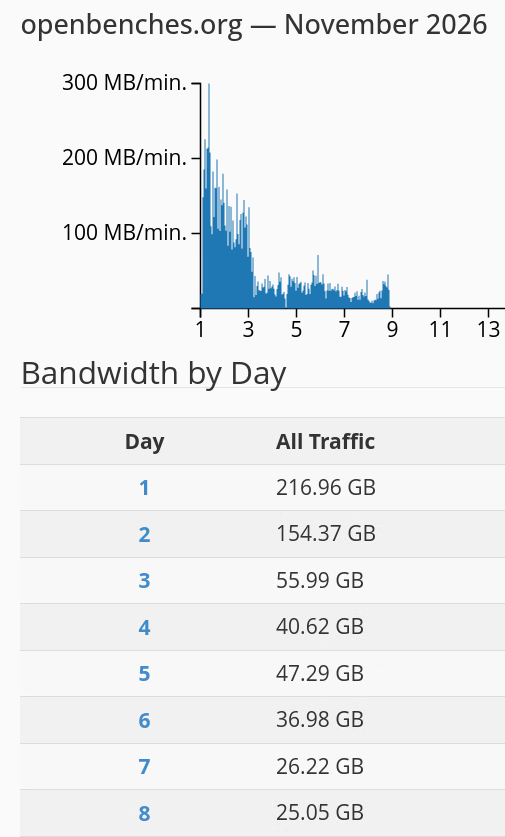
B6는 robots.txt에서 접근을 금지한 숨은 허니팟에 방문하면 해당 IP를 .htaccess에 등록해 사이트 전체 접근을 차단하는 도구임 OpenBenches.org 적용 사례에서 봇 트래픽이 80% 넘게 줄었으며, 하루 데이터 전송량은 최고 216GB에서 약 25GB로 감소함…
Reply | Reply to original comment on news.hada.io 2026-11-11 08:02
- nokke @Edent One interesting pattern I've noticed, a lot of things try non-SSL before SSL. Here's a filter.d/ to trap them on the port 80 redirect action: # Excessive http -> https 301 redirects which bypass the 404 check# ignore: "GET / HTTP/1.1" 301# ignore: "GET /favicon.ico HTTP/1.1" 301# trap: "GET /.env HTTP/1.1" 301# trap: "GET /wp-admin/admin.php HTTP/1.1" 301[Definition]failregex = ^<HOST>."(GET|POST) /S.+" 301 .$ignoreregex = (/favicon.ico|/robots.txt|security.txt) Reply | Reply to original comment on mstdn.social 2026-11-11 13:06
nokke
@Edent One interesting pattern I've noticed, a lot of things try non-SSL before SSL. Here's a filter.d/ to trap them on the port 80 redirect action:
Excessive http -> https 301 redirects which bypass the 404 check# ignore: "GET / HTTP/1.1" 301# ignore: "GET /favicon.ico HTTP/1.1" 301# trap: "GET /.env HTTP/1.1" 301# trap: "GET /wp-admin/admin.php HTTP/1.1" 301[Definition]failregex = ^<HOST>.*"(GET|POST) /S.+" 301 .*$ignoreregex = (/favicon.ico|/robots.txt|security.txt)
Reply | Reply to original comment on mstdn.social 2026-11-11 13:06
- Josh Anderson Very nice! I do recommend throwing the block data into an sqlite DB instead of writing directly to .htaccess. The DB lets you record whatever metadata you want in a way that's easy to query later, and it avoids race conditions in writing out a new .htaccess. (You can have a cron job that rewrites .htaccess every minute if the DB has been updated, or fire off an update script (with locking) on-demand by shelling out to at now ....) Reply 2026-11-11 20:37
Josh Anderson
Very nice! I do recommend throwing the block data into an sqlite DB instead of writing directly to .htaccess. The DB lets you record whatever metadata you want in a way that's easy to query later, and it avoids race conditions in writing out a new .htaccess. (You can have a cron job that rewrites .htaccess every minute if the DB has been updated, or fire off an update script (with locking) on-demand by shelling out to at now ....)
Reply 2026-11-11 20:37
- More comments on Mastodon.